As we saw in Chapter 5.3, the singular value decomposition of a matrix X into X=UΣVT can be used to find the best low-rank approximation of X, which has applications in image compression, for example. But, hiding in the singular value decomposition is another, more data-driven application: dimensionality reduction.
Consider, for example, the dataset below. Each row corresponds to a penguin.
import seaborn as sns
penguins = sns.load_dataset('penguins').dropna()
penguins
Loading...
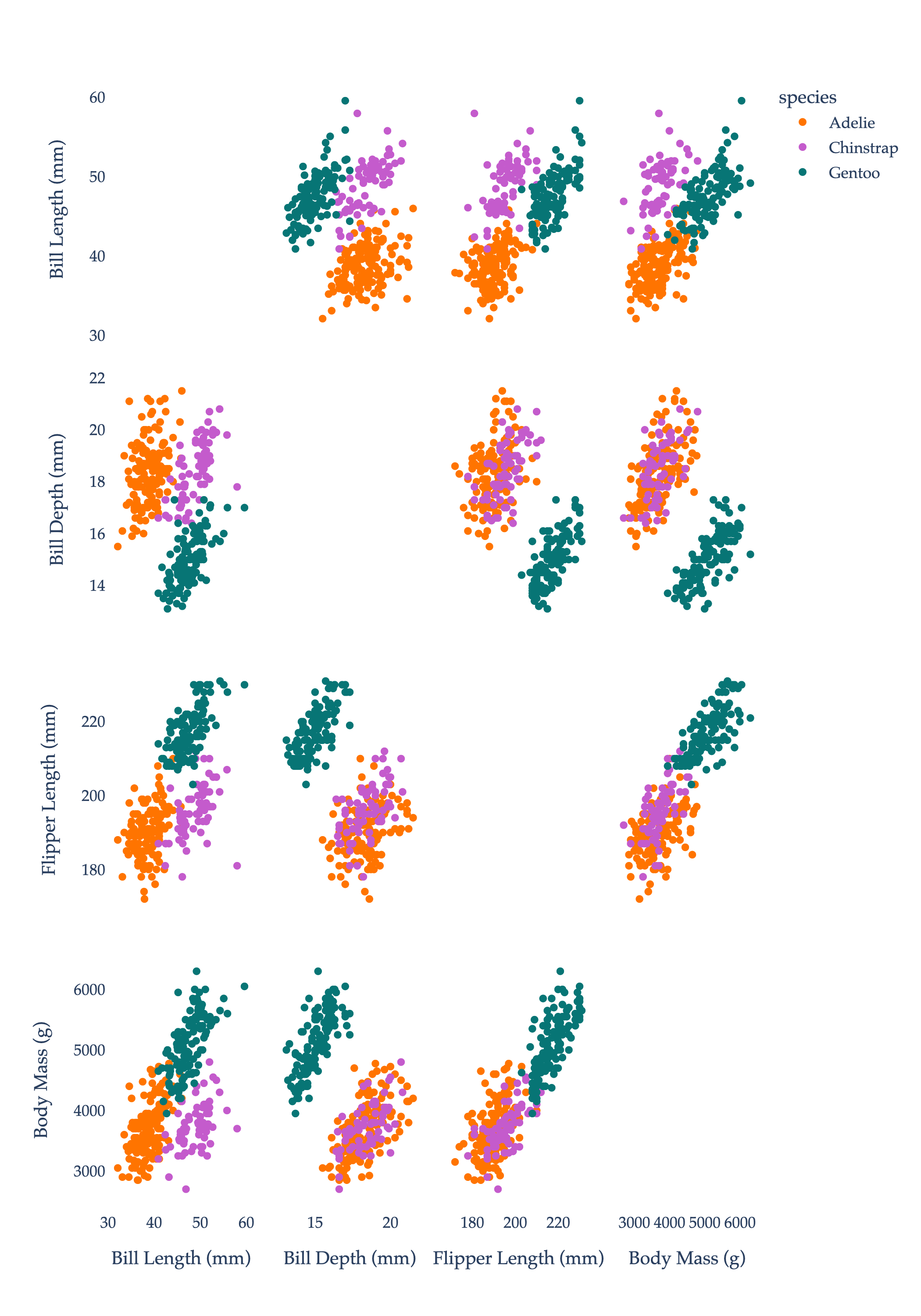
Each penguin has three categorical features – species, island, and sex – and four numerical features – bill_length_mm, bill_depth_mm, flipper_length_mm, and body_mass_g. If we restrict our attention to these numerical features, we have a 333×4 matrix, which we can think of as 333 points in R4. We, of course, can’t visualize in R4. One solution is to draw scatter plots of all pairs of numerical features. Points are colored by species.
import plotly.express as px

numeric_features = ['bill_length_mm', 'bill_depth_mm', 'flipper_length_mm', 'body_mass_g']

# Custom color mapping for species
species_color_map = {
    'Adelie': '#ff7400',
    'Chinstrap': '#c45bcc',
    'Gentoo': '#077575'
}

fig = px.scatter_matrix(
    penguins,
    dimensions=numeric_features,
    color='species',
    labels={
        'bill_length_mm': 'Bill Length (mm)',
        'bill_depth_mm': 'Bill Depth (mm)',
        'flipper_length_mm': 'Flipper Length (mm)',
        'body_mass_g': 'Body Mass (g)'
    },
    color_discrete_map=species_color_map,
)

fig.update_traces(diagonal_visible=False)
fig.update_layout(
    height=1000,
    font_family="Palatino",
    paper_bgcolor="white",
    plot_bgcolor="white",
)

# Set axis background and major/minor gridline colors, and font for axes
# fig.update_xaxes(showgrid=True, gridwidth=1, gridcolor="#f0f0f0", zeroline=False, showline=True, linecolor="#ccc", ticks="outside", tickfont_family="Palatino")
# fig.update_yaxes(showgrid=True, gridwidth=1, gridcolor="#f0f0f0", zeroline=False, showline=True, linecolor="#ccc", ticks="outside", tickfont_family="Palatino")

fig.show(renderer='png', scale=3)
While we have four features (or “independent” variables) for each penguin, it seems that some of the features are strongly correlated, in the sense that the correlation coefficient
r=n1i=1∑n(σxxi−xˉ)(σyyi−yˉ)
between them is close to ±1. (To be clear, the coloring of the points is by species, which does not impact the correlations between features.)
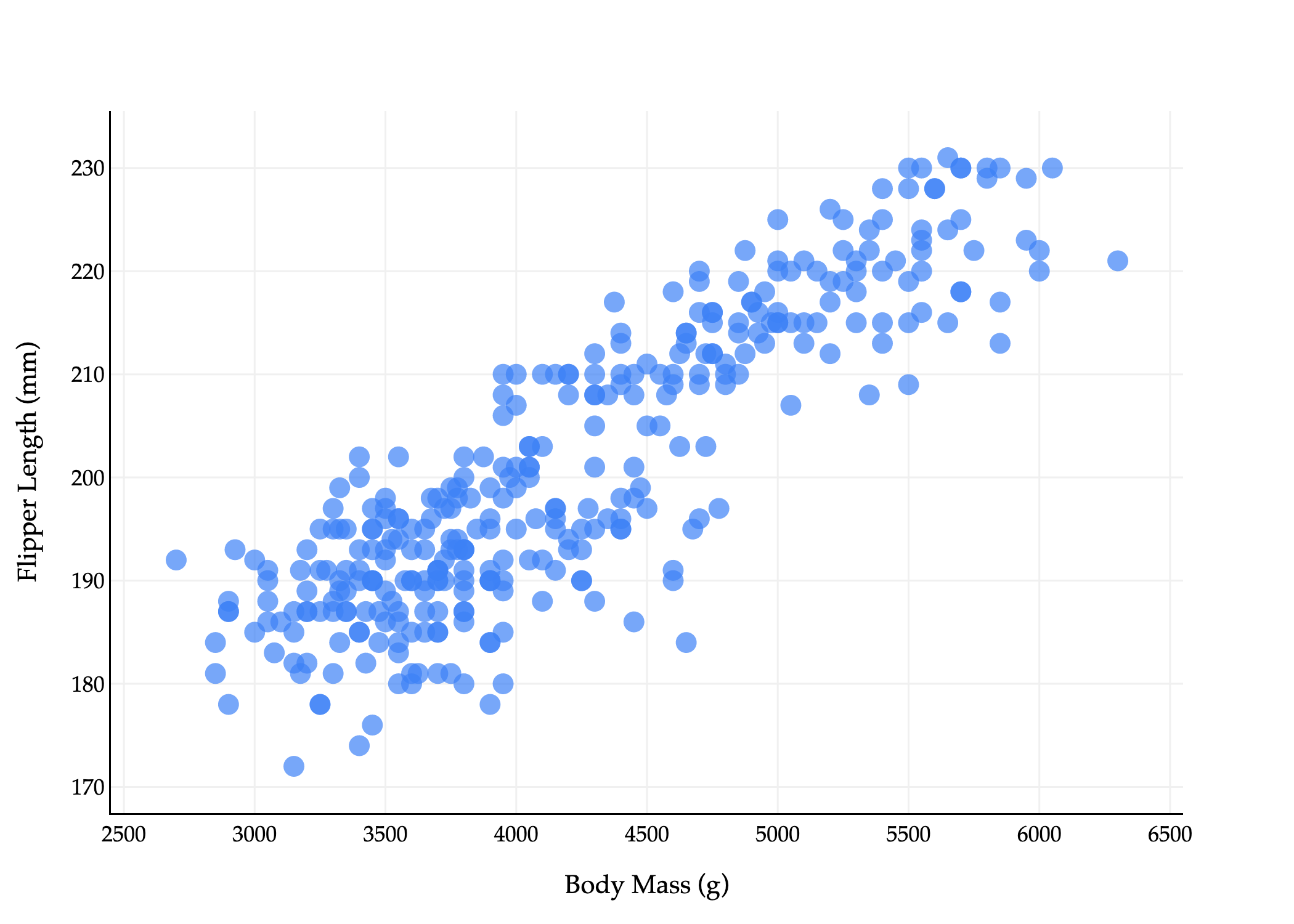
For instance, the correlation between flipper_length_mm and body_mass_g is about 0.87, which suggests that penguins with longer flippers tend to be heavier. Not only are correlated features redundant, but they can cause interpretability issues – that is, multicollinearity – when using them in a linear regression model, since the resulting optimal parameters w∗ will no longer be interpretable. (Remember, in h(xi)=w⋅Aug(xi), w∗ contains the optimal coefficients for each feature, which measure rates of change when the other features are held constant. But if two features are correlated, one can’t be held constant without also changing the other.)
Here’s the key idea: instead of having to work with d=4 features, perhaps we can instead construct some number k<d of new features that:
capture the “most important” information in the dataset,
while being uncorrelated (i.e. linearly independent) from one another.
I’m not suggesting that we just select some of the original features and drop the others; rather, I’m proposing that we find 1 or 2 new features that are linear combinations of the original features. If everything works out correctly, we may be able to reduce the number of features we need to deal with, without losing too much information, and without the interpretability issues that come with multicollinearity.
To illustrate what I mean by constructing a new feature, let’s suppose we’re starting with a 2-dimensional dataset, which we’d like to reduce to 1 dimension. Consider the scatter plot below of flipper_length_mm vs. body_mass_g (with colors removed).
Above, each penguin is represented by two numbers, which we can think of as a vector
xi=[body massiflipper lengthi]
The fact that each point is a vector is not immediately intuitive given the plot above: I want you to imagine drawing arrows from the origin to each point.
Now, suppose these vectors xi are in the rows of a matrix X, i.e.
Our goal is to construct a single new feature, called a principal component, by taking a linear combination of both existing features. Principal component analysis, or PCA, is the process of finding the best principal components (new features) for a dataset.
new featurei=a⋅body massi+b⋅flipper lengthi
This is equivalent to approximating this 2-dimensional dataset with a single line. (The equation above is a re-arranged version of y=mx+b, where x is body massi and y is flipper lengthi.)
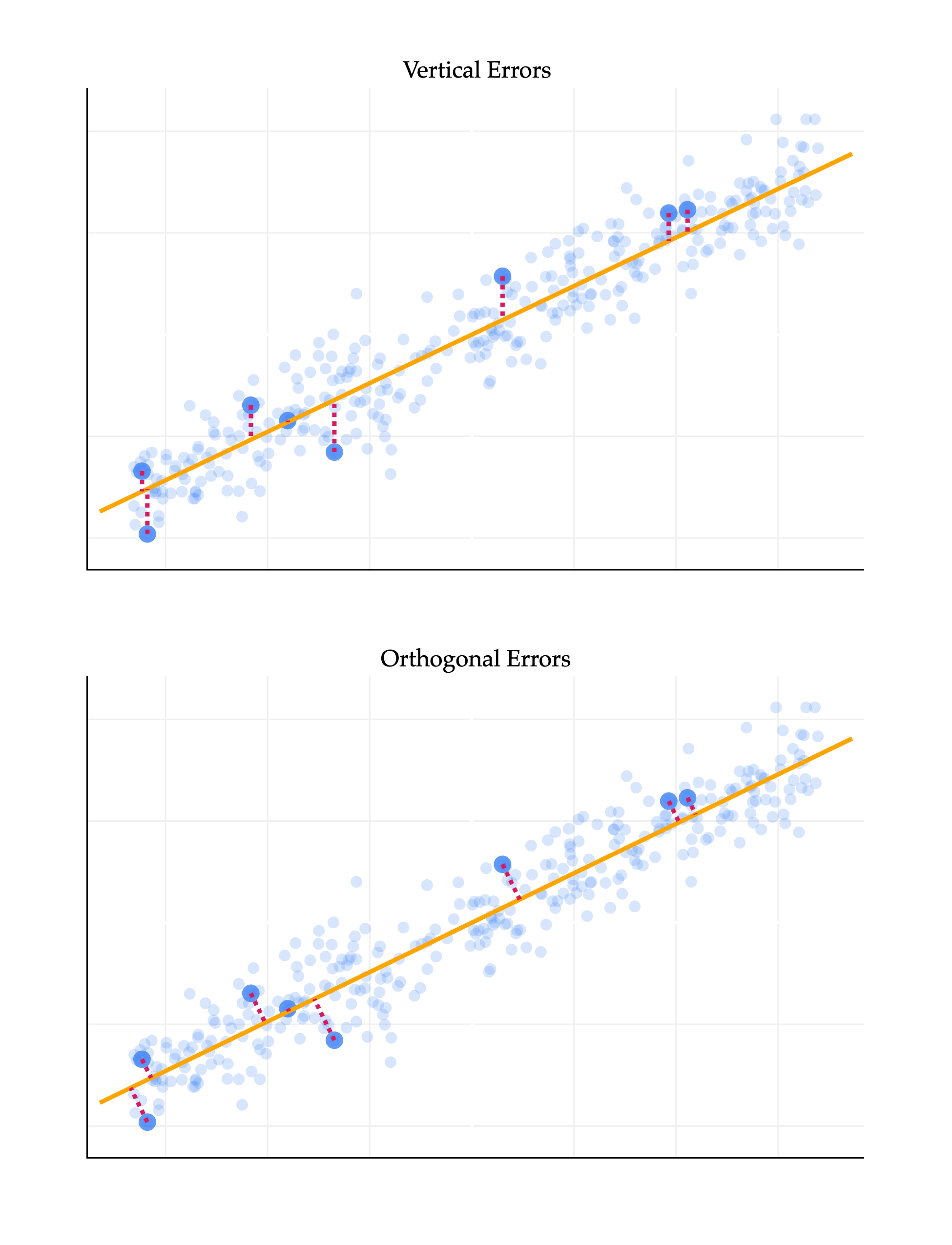
What is the best linear combination of the features, or equivalently, what is the best line to approximate this 2-dimensional dataset? To make this idea precise, we need to define what we mean by “best”. It may be tempting to think that we should find the best-fitting line that predicts flipper_length_mm from body_mass_g, but that’s not quite what we want, since this is not a prediction problem: it’s a representation problem. Regression lines in the way we’ve seen them before are fit by minimizing mean squared vertical error, yi−h(xi), but don’t at all capture horizontal errors, i.e. errors in the body_mass_g direction here.
So instead, we’d like to find the line such that, for our n vectors (points) x1,…,xn, the mean squared distance to the closest vector (point) on the line is minimized. Crucially, this distance is calculated by computing the norm of the difference between the two vectors. If pi is the closest vector (point) on the line to xi, then we’d like to minimize
n1i=1∑n∥xi−pi∥2
But, as we saw in Chapter 2.3, the vector (point) on a line that is closest to another vector (point) xi is the orthogonal projection of xi onto that line. The resulting error vectors are orthogonal to the line we’re projecting on. As such, I’ll say that we’re looking for the line that minimizes the mean squared orthogonal projection error.
import plotly.graph_objects as go
from plotly.subplots import make_subplots
import numpy as np
import pandas as pd
from sklearn.linear_model import LinearRegression
from sklearn.decomposition import PCA

# --- DATA GENERATION (Synthetic Data) ---
# Using synthetic data as the external 'penguins' dataset was inaccessible.
np.random.seed(42)
num_points = 340
body_mass_g = np.random.uniform(2700, 6300, num_points)
m_true = 0.015
c_true = 120
noise = np.random.normal(0, 5, num_points)
flipper_length_mm = m_true * body_mass_g + c_true + noise

df = pd.DataFrame({
    'body_mass_g': body_mass_g,
    'flipper_length_mm': flipper_length_mm
})

# --- STANDARDIZATION ---
# Standardize both columns to mean=0, std=1
for col in ['body_mass_g', 'flipper_length_mm']:
    mean = df[col].mean()
    std = df[col].std()
    df[col + '_std'] = (2 if col == 'body_mass_g' else 1) * (df[col] - mean) / std

data_2d = df[['body_mass_g_std', 'flipper_length_mm_std']].values

# --- MODEL FITTING on standardized data ---
# Linear Regression (still fit flipper_length_mm_std ~ body_mass_g_std)
lin_reg = LinearRegression()
lin_reg.fit(df[['body_mass_g_std']], df['flipper_length_mm_std'])
m_lr = lin_reg.coef_[0]
c_lr = lin_reg.intercept_

# PCA
pca = PCA(n_components=1)
pca.fit(data_2d)
v1 = pca.components_[0]
mean_data = pca.mean_

# --- SELECTION & RANGE ---
random_indices = np.random.choice(df.index, size=8, replace=False)
random_points = df.iloc[random_indices]

x_min, x_max = df['body_mass_g_std'].min(), df['body_mass_g_std'].max()
x_padding = (x_max - x_min) * 0.05
x_range = np.array([x_min - x_padding, x_max + x_padding])

# --- CALCULATIONS: LINEAR REGRESSION (Top Plot) ---
y_lr_line = m_lr * x_range + c_lr
lr_errors = []
for i in random_indices:
    x_i, y_i = df.loc[i, 'body_mass_g_std'], df.loc[i, 'flipper_length_mm_std']
    y_hat = m_lr * x_i + c_lr
    # Vertical error segment: (x_i, y_i) to (x_i, y_hat)
    lr_errors.append(go.Scatter(
        x=[x_i, x_i, None],
        y=[y_i, y_hat, None],
        mode='lines',
        line=dict(color='#d81a60', width=3, dash='dot'),
        showlegend=False,
        hoverinfo='none'
    ))

# --- CALCULATIONS: PCA (Bottom Plot) ---
# Parametric line points
t_min = (x_range.min() - mean_data[0]) / v1[0]
t_max = (x_range.max() - mean_data[0]) / v1[0]
x_pca_line = np.array([mean_data[0] + t_min * v1[0], mean_data[0] + t_max * v1[0]])
y_pca_line = np.array([mean_data[1] + t_min * v1[1], mean_data[1] + t_max * v1[1]])

# pca_errors = []
# for idx in random_indices:
#     p_i = data_2d[idx]
#     projection_scalar = np.dot(p_i - mean_data, v1)
#     p_tilde = mean_data + projection_scalar * v1
#     # Orthogonal error segment: (p_i) to (p_tilde)
#     pca_errors.append(go.Scatter(
#         x=[p_i[0], p_tilde[0], None],
#         y=[p_i[1], p_tilde[1], None],
#         mode='lines',
#         line=dict(color='#d81a60', width=3, dash='dot'),
#         showlegend=False,
#         hoverinfo='none'
#     ))

# --- CREATE SUBPLOTS ---
fig = make_subplots(
    rows=2,
    cols=1,
    shared_xaxes=False,
    vertical_spacing=0.1,
    subplot_titles=("Vertical Errors", "Orthogonal Errors")
)

## TOP PLOT (ROW 1): LINEAR REGRESSION
# 1. Full Scatter (Low Opacity)
fig.add_trace(go.Scatter(
    x=df['body_mass_g_std'], y=df['flipper_length_mm_std'], mode='markers',
    marker=dict(color="#3D81F6", size=8, opacity=0.2, line_width=0),
    name='All Points (LR)', showlegend=False
), row=1, col=1)

# 2. Selected Scatter (High Opacity)
fig.add_trace(go.Scatter(
    x=random_points['body_mass_g_std'], y=random_points['flipper_length_mm_std'], mode='markers',
    marker=dict(color="#3D81F6", size=12, opacity=0.8, line_width=0),
    name='Selected Points', legendgroup='selected', showlegend=True
), row=1, col=1)

# 3. Line of Best Fit
fig.add_trace(go.Scatter(
    x=x_range, y=y_lr_line, mode='lines',
    line=dict(color='orange', width=3),
    name='Line of Best Fit', legendgroup='lines', showlegend=True
), row=1, col=1)

# 4. Vertical Errors (Placeholder for Legend)
fig.add_trace(go.Scatter(
    x=[None], y=[None], mode='lines',
    line=dict(color='#d81a60', width=1.5, dash='dot'),
    name='Errors', legendgroup='errors', showlegend=True
), row=1, col=1)
for error_trace in lr_errors:
    fig.add_trace(error_trace, row=1, col=1)


## BOTTOM PLOT (ROW 2): PCA
# 1. Full Scatter (Low Opacity)
fig.add_trace(go.Scatter(
    x=df['body_mass_g_std'], y=df['flipper_length_mm_std'], mode='markers',
    marker=dict(color="#3D81F6", size=8, opacity=0.2, line_width=0),
    name='All Points (PCA)', showlegend=False
), row=2, col=1)

# 2. Selected Scatter (High Opacity)
fig.add_trace(go.Scatter(
    x=random_points['body_mass_g_std'], y=random_points['flipper_length_mm_std'], mode='markers',
    marker=dict(color="#3D81F6", size=12, opacity=0.8, line_width=0),
    name='Selected Points', legendgroup='selected', showlegend=False
), row=2, col=1)

# 3. First Principal Component Line
fig.add_trace(go.Scatter(
    x=x_pca_line, y=y_pca_line, mode='lines',
    line=dict(color='orange', width=3),
    name='First Principal Component', legendgroup='lines', showlegend=True
), row=2, col=1)

# 4. Orthogonal Errors
for error_trace in pca_errors:
    fig.add_trace(error_trace, row=2, col=1)

# --- APPLY STYLING: Equal aspect ratio for both axes in row 2 ---
common_axis_style = dict(
    title='Flipper Length (standardized)',
    gridcolor='#f0f0f0', showline=True, linecolor="black", linewidth=1,
)
fig.update_yaxes(common_axis_style, row=1, col=1)
fig.update_yaxes(common_axis_style, row=2, col=1)

fig.update_xaxes(
    title='Body Mass (standardized)', gridcolor='#f0f0f0', showline=True, linecolor="black", linewidth=1,
    row=2, col=1
)
fig.update_xaxes(
    gridcolor='#f0f0f0', showline=True, linecolor="black", linewidth=1, row=1, col=1
) # No x-axis title on top plot

# Set aspectmode='equal' for bottom plot only
fig.update_yaxes(
    scaleanchor = "x", scaleratio = 1,
    row=1, col=2,
    title=''
)
fig.update_xaxes(
    constrain='domain',
    row=2, col=1,
)

fig.update_xaxes(
    title='',
    showticklabels=False
)

fig.update_yaxes(
    title='',
    showticklabels=False
)

fig.update_layout(
    plot_bgcolor='white', paper_bgcolor='white',
    margin=dict(l=60, r=60, t=60, b=60),
    width=650, height=850,
    font=dict(family="Palatino Linotype, Palatino, serif", color="black"),
    showlegend=False
)

fig.show(renderer='png', scale=3)
The difference between the two lines above is key. The top line reflects the supervised nature of linear regression, where the goal is to make accurate predictions. The bottom line reflects the fact that we’re looking for a new representation of the data that captures the most important information. These, in general, are not the same line, since they’re chosen to minimize different objective functions.
Recall from Chapter 1 that unsupervised learning is the process of finding structure in unlabeled data, without any specific target variable. This is precisely the problem we’re trying to solve here. To further distinguish our current task from the problem of finding regression lines, I’ll now refer to finding the line with minimal orthogonal projection error as finding the best direction.
The first section above told us that our goal is to find the best direction, which is the direction that minimizes the mean squared orthogonal error of projections onto it. How do we find this direction?
Fortunately, we spent all of Chapter 2.3 and Chapter 2.10 discussing orthogonal projections. But there, we discussed how to project one vector onto the span of one or more other given vectors (e.g. projecting the observation vector y onto the span of the columns of a design matrix X). That’s not quite we’re doing here, because here, we don’t know which vector we’re projecting onto: we’re trying to find the best vector to project our n=333 other vectors onto!
Suppose that in general, X is an n×d matrix, whose rows xi are data points in Rd. (In our current example, d=2, but everything we’re studying applies in higher dimensions.) Then,
The orthogonal projection of xi onto v is
pi=v⋅vxi⋅vv
To keep the algebra slightly simpler, if we assume that v is a unit vector (meaning ∥v∥=v⋅v=1), then the orthogonal projection of xi onto v is
pi=(xi⋅v)v
This is a reasonable choice to make, since unit vectors are typically used to describe directions.
If v∈Rd, then span({v}) is a line through the origin in Rd.
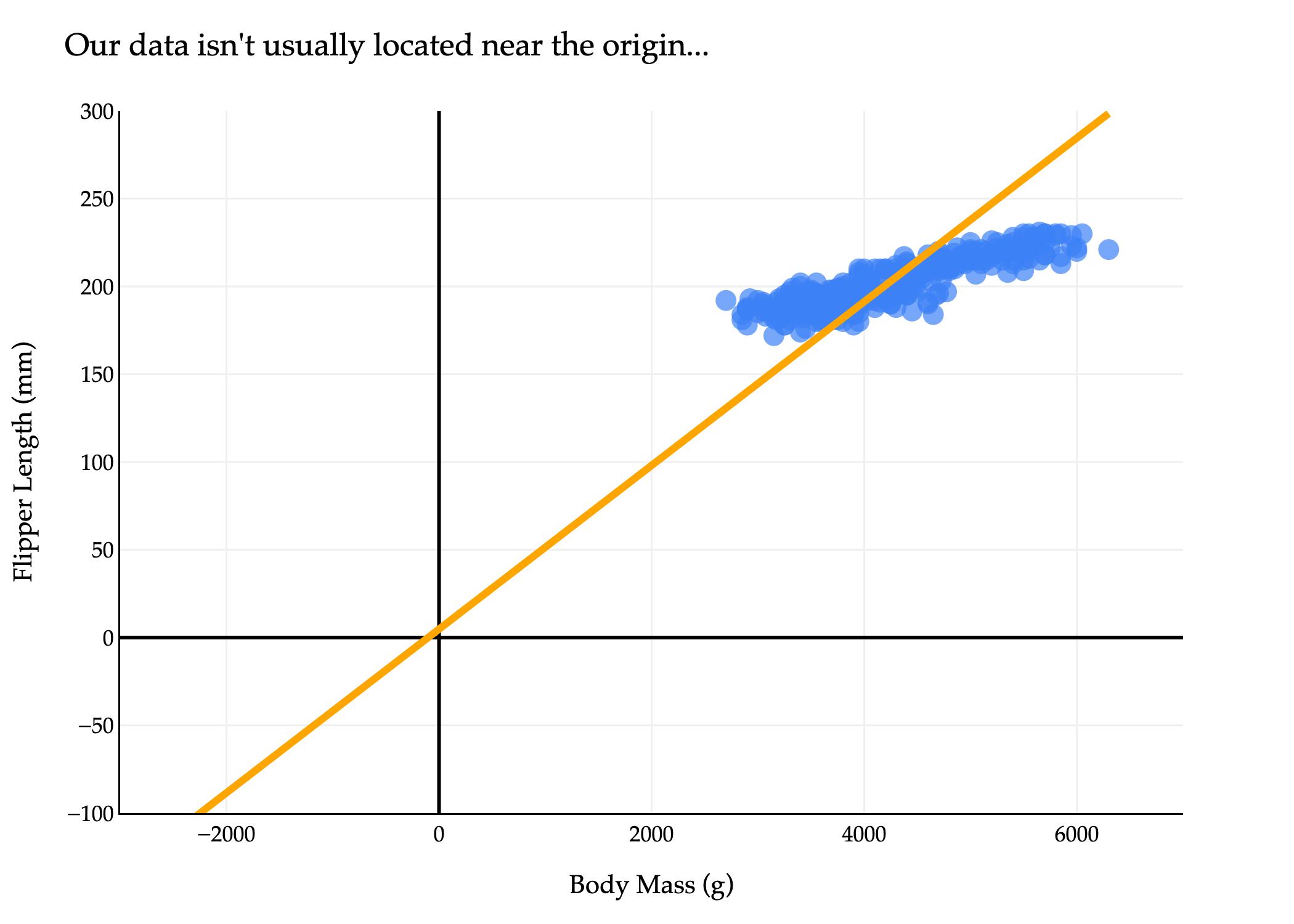
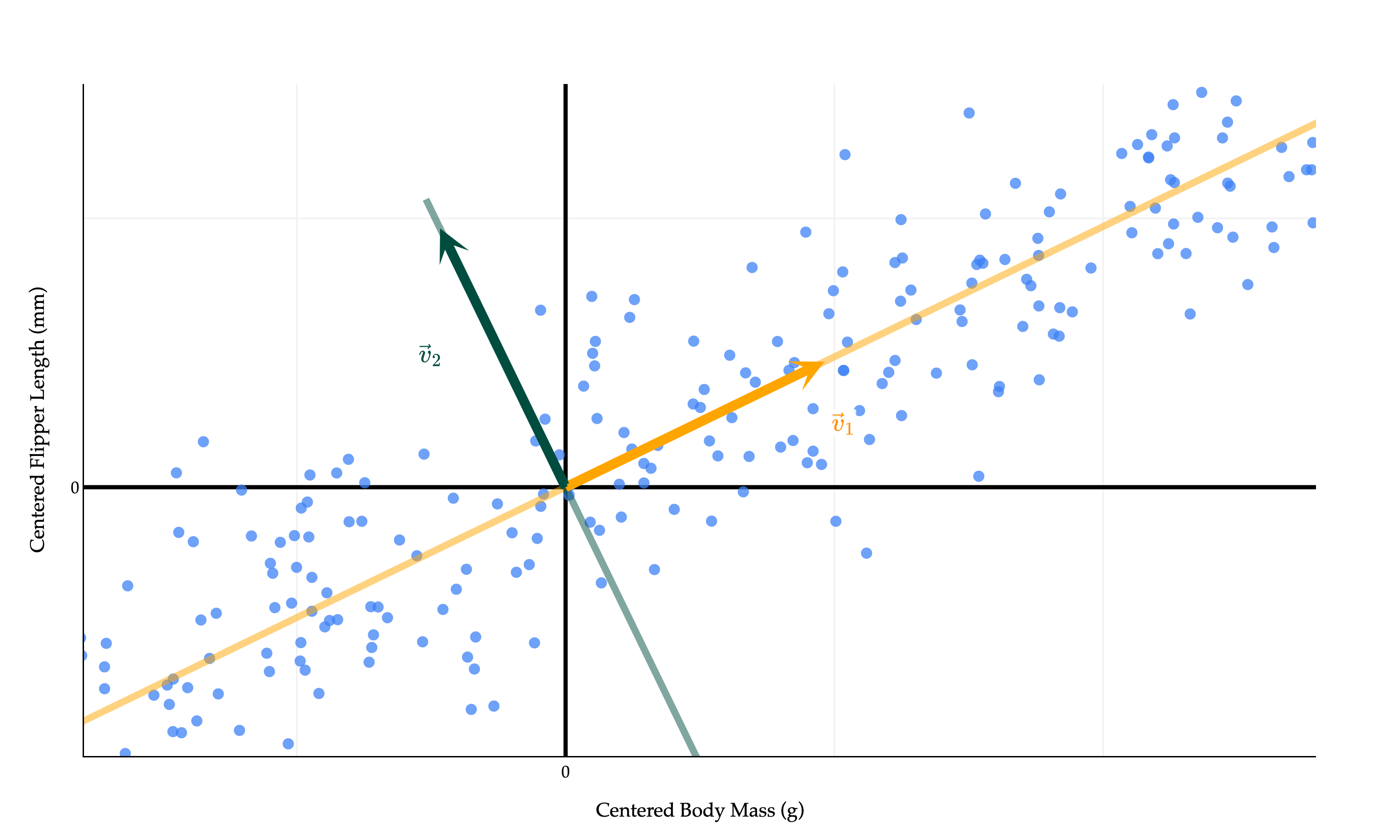
The issue is that our dataset – and most datasets in general, by default – aren’t centered at the origin, but the projections pi=(xi⋅v)v all lie on the line through the origin spanned by v. So, trying to approximate our dataset using a line through the origin is not a good idea.
import plotly.express as px
import numpy as np

# Scatter plot as before
fig = px.scatter(
    penguins,
    x='body_mass_g',
    y='flipper_length_mm',
    size=np.ones(len(penguins)) * 50,
    size_max=8,
    labels={
        "flipper_length_mm": "Flipper Length (mm)",
        "body_mass_g": "Body Mass (g)"
    }
)
fig.update_xaxes(
    title='Body Mass (g)',
    gridcolor='#f0f0f0',
    showline=True,
    linecolor="black",
    linewidth=1,
    zeroline=True,              # Add the zeroline (x=0)
    zerolinewidth=2,
    zerolinecolor="#000"
)
fig.update_yaxes(
    title='Flipper Length (mm)',
    gridcolor='#f0f0f0',
    showline=True,
    linecolor="black",
    linewidth=1,
    zeroline=True,              # Add the zeroline (y=0)
    zerolinewidth=2,
    zerolinecolor="#000"
)
fig.update_traces(marker_color="#3D81F6", marker_line_width=0)
fig.update_layout(
    plot_bgcolor='white',
    paper_bgcolor='white',
    margin=dict(l=60, r=60, t=60, b=60),
    width=700,
    font=dict(
        family="Palatino Linotype, Palatino, serif",
        color="black"
    )
)

# --- Why doesn't the orange line pass through the origin? ---
# We are calculating the principal component direction using the uncentered data.
# That is, we use the original values of body_mass_g and flipper_length_mm,
# not values shifted so that their mean is zero.
# The line we draw to indicate the main data direction is then *anchored at the mean* of the data,
# not at the origin (0, 0).
#
# In PCA, the principal component direction is meant to describe the direction *from the center of the data*,
# not necessarily from the origin—unless the data itself has the origin as its center.

# Compute mean and principal direction from UNcentered data
X_no_center = penguins[['body_mass_g', 'flipper_length_mm']].dropna().values
mean_point = np.mean(X_no_center, axis=0)

# SVD gives principal directions, but if we don't center, the "line through the origin"
# describes how the data is spread around its mean, not around (0,0).
U, S, Vt = np.linalg.svd(X_no_center, full_matrices=False)
direction = Vt[0]
direction = direction / np.linalg.norm(direction)

# Find t values so that the orange line spans the plot regardless of origin
bm_min, bm_max = penguins['body_mass_g'].min(), penguins['body_mass_g'].max()
t0 = (-3000 - mean_point[0]) / direction[0]
t1 = (bm_max - mean_point[0]) / direction[0]
line_bm = mean_point[0] + np.array([t0, t1]) * direction[0]
line_fl = mean_point[1] + np.array([t0, t1]) * direction[1]

fig.add_traces([
    {
        "type": "scatter",
        "mode": "lines",
        "x": line_bm,
        "y": line_fl,
        "line": dict(color="orange", width=4),
        "name": "Principal Direction (uncentered)"
    }
])

fig.update_layout(
    xaxis_range=[-3000, 7000],
    yaxis_range=[-100, 300],
    showlegend=False,
    title="Our data isn't usually located near the origin..."
)
fig.show(renderer='png', scale=3)

# Explanation:
# The orange line follows the principal direction of the data, but is anchored on the mean value of
# (body_mass_g, flipper_length_mm). Since the mean is NOT the origin (0,0), the line will not
# pass through the origin. This illustrates why, when analyzing data directions, we almost always
# first center the data (subtract the mean), so the principal direction can be represented as a
# line through the origin in the transformed coordinates.
import plotly.express as px
import numpy as np

# Center the data
X = penguins[['body_mass_g', 'flipper_length_mm']].dropna().values
X_mean = np.mean(X, axis=0)
X_centered = X - X_mean

# Scatter plot of centered data
fig = px.scatter(
    x=X_centered[:, 0],  # body_mass_g (centered)
    y=X_centered[:, 1],  # flipper_length_mm (centered)
    size=np.ones(len(X_centered)) * 50,
    size_max=8,
    labels={
        "x": "Body Mass (g) (centered)",
        "y": "Flipper Length (mm) (centered)"
    }
)
fig.update_xaxes(
    title='Centered Body Mass (g)',
    gridcolor='#f0f0f0',
    showline=True,
    linecolor="black",
    linewidth=1,
    zeroline=True,
    zerolinewidth=2,
    zerolinecolor="black",
)
fig.update_yaxes(
    title='Centered Flipper Length (mm)',
    gridcolor='#f0f0f0',
    showline=True,
    linecolor="black",
    linewidth=1,
    zeroline=True,
    zerolinewidth=2,
    zerolinecolor="black",
)
fig.update_traces(marker_color="#3D81F6", marker_line_width=0)
fig.update_layout(
    plot_bgcolor='white',
    paper_bgcolor='white',
    margin=dict(l=60, r=60, t=60, b=60),
    width=700,
    font=dict(
        family="Palatino Linotype, Palatino, serif",
        color="black"
    )
)

# --- PCA/SVD for centered data: best-fit line through origin ---
U, S, Vt = np.linalg.svd(X_centered, full_matrices=False)
direction = Vt[0]
direction = direction / np.linalg.norm(direction)  # unit vector

# Draw the principal component line through the origin (since data is centered)
# We'll parametrize t over a sufficiently wide range to cover the data cloud
pc_range = 3 * np.array([
    np.min(X_centered @ direction),
    np.max(X_centered @ direction)
])
line_pts = np.outer(pc_range, direction)  # shape (2,2)

fig.add_traces([
    {
        "type": "scatter",
        "mode": "lines",
        "x": line_pts[:, 0],
        "y": line_pts[:, 1],
        "line": dict(color="orange", width=4),
        "name": "Principal Component"
    }
])

# Set axis to center zero for clarity and cover data
margin_bm = 0.1 * (X_centered[:,0].max() - X_centered[:,0].min())
margin_fl = 0.1 * (X_centered[:,1].max() - X_centered[:,1].min())
fig.update_layout(
    xaxis_range=[
        X_centered[:,0].min() - margin_bm,
        X_centered[:,0].max() + margin_bm
    ],
    yaxis_range=[
        X_centered[:,1].min() - margin_fl,
        X_centered[:,1].max() + margin_fl
    ],
    showlegend=False,
    title="Best-Fit PCA Line (Centered Data)"
)

fig.update_layout(xaxis_range=[-3000, 7000], yaxis_range=[-100, 300], showlegend=False, title="...which is why we center the data first! This doesn't change its shape.")
fig.show(renderer='png', scale=3)
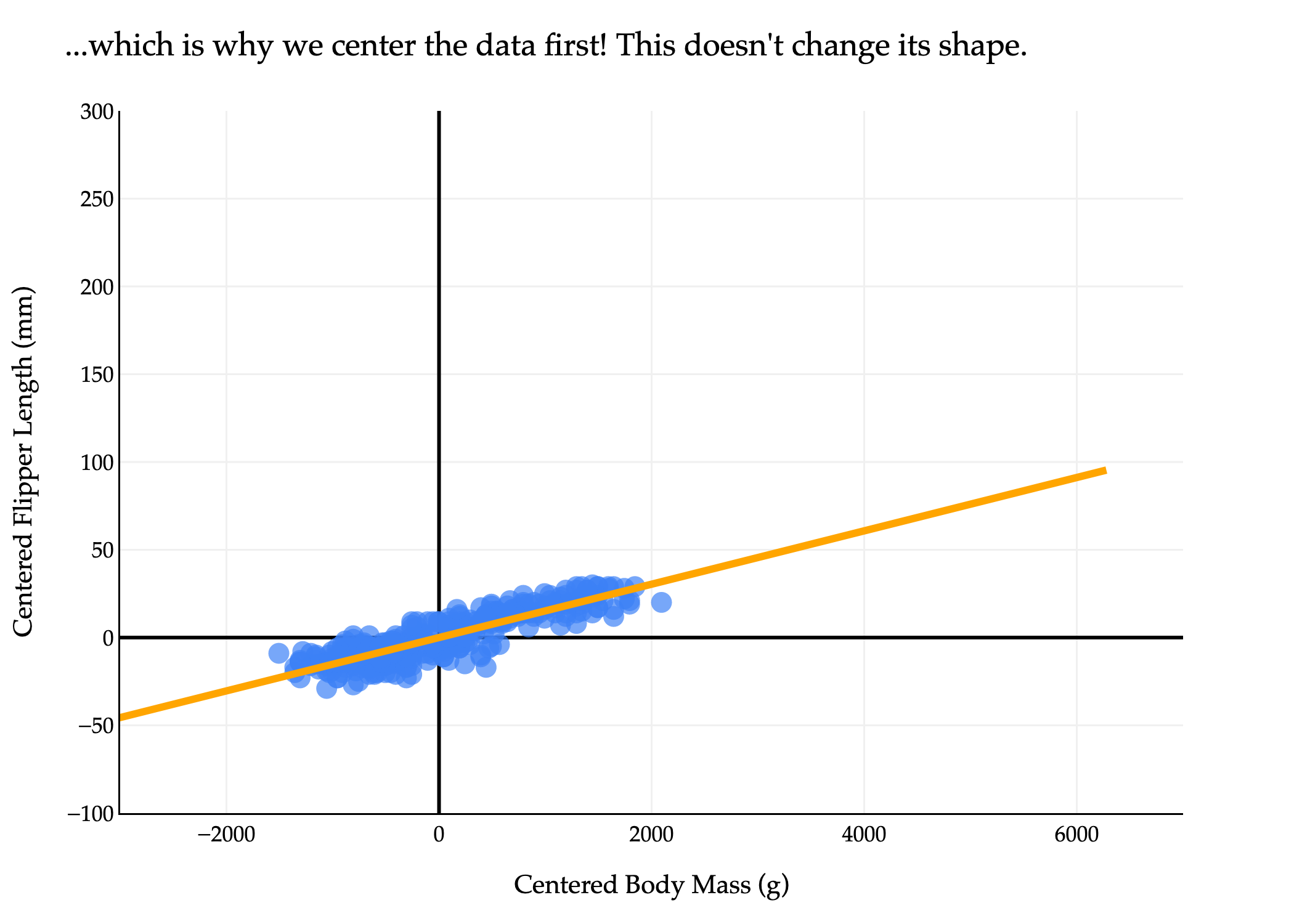
So, the solution is to first center the data by subtracting the mean of each column from each entry in that column. This gives us a new matrix X~.
In X~, the mean of each column is 0, which means that it’s reasonable to approximate the dataset using a line through the origin. Importantly, this doesn’t change the shape of the dataset, meaning it doesn’t change the “best direction” we’re searching for.
Now, X~ is the n×d matrix of centered data, and we’re ready to return to our goal of finding the best direction. Let x~i∈Rd refer to row i of X~. Note that I’ve dropped the vector symbol on top of x~i, not because it’s not a vector, but just because drawing a tilde on top of a vector hat is a little funky: x~i.
Our goal is to find the unit vectorv∈Rd that minimizes the mean squared orthogonal projection error. That is, if the orthogonal projection of x~i onto v is pi, then we want to find the unit vector v that minimizes
I’ve chosen the letter J since there is no standard notation for this quantity, and because J is a commonly used letter in optimization problems. It’s important to note that J is not a loss function, nor is it an empirical risk, since it has nothing to do with prediction.
How do we find the unit vector v that minimizes J(v)? We can start by expanding the squared norm, using the fact that ∥a−b∥2=∥a∥2−2a⋅b+∥b∥2:
The first term, n1∑i=1n∥x~i∥2, is constant with respect to v, meaning we can ignore it for the purposes of minimizing J(v). Our focus, then, is on minimizing the second term,
−n1i=1∑n(x~i⋅v)2
But, since the second term has a negative sign in front of it, minimizing it is equivalent to maximizing its positive counterpart,
Finding the best direction is equivalent to finding the unit vector v that maximizes the mean squared value of x~i⋅v. What is this quantity, though? Remember, the projection of x~i onto v is given by
pi=(x~i⋅v)v
All n of our original data points are projected onto v, meaning that each x~i is approximated by some scalar multiple (x~i⋅v) of v. These scalar multiples are our new feature values – that is, the values of the first principal component (first because this is the “best” direction).
import pandas as pd
import plotly.graph_objects as go
import numpy as np

# Use the same synthetic data as above, so the aspect is "fair"
np.random.seed(102)
num_points = 340
body_mass_g = np.random.uniform(2700, 6300, num_points)
m_true = 0.015
c_true = 120
noise = np.random.normal(0, 5, num_points)
flipper_length_mm = m_true * body_mass_g + c_true + noise

df = pd.DataFrame({
    'body_mass_g': body_mass_g,
    'flipper_length_mm': flipper_length_mm
})

# Standardize both columns to mean=0, std=1 for correct orthogonal aspect
df['body_mass_std'] = (df['body_mass_g'] - df['body_mass_g'].mean()) / df['body_mass_g'].std()
df['flipper_length_std'] = (df['flipper_length_mm'] - df['flipper_length_mm'].mean()) / df['flipper_length_mm'].std()
X = df[['body_mass_std', 'flipper_length_std']].values
X[:, 0] *= 2 # Scale x-axis for visual effect (as in original)

count_show = 5

# Fix the randomness: pick 25 random indices, keep correspondence for projections
rng = np.random.default_rng(51)
indices = rng.choice(len(X), replace=False, size=count_show)
X_subset = X[indices]   # shape (25, 2)

# Get best-fit direction using SVD/PCA
U, S, Vt = np.linalg.svd(X, full_matrices=False)
direction = Vt[0]
direction = direction / np.linalg.norm(direction)

# Project points in subset onto PCA line: scalar projections t_i and nearest points
ts = X_subset @ direction
proj_points = np.outer(ts, direction)  # shape (25,2)

# For labeling: pick 2 random points (from 25), annotate with their scalar times v
label_indices = rng.choice(count_show, size=count_show, replace=False)
label_indices = np.sort(label_indices)

# Plot setup with all standardized points (faded)
fig = go.Figure()
fig.add_trace(go.Scatter(
    x=X[:,0], y=X[:,1],
    mode='markers',
    marker=dict(color="#3D81F6", size=8, opacity=0.25),
    showlegend=False,
    hoverinfo='skip'
))

# Scatter for the selected 25 points (emphasized)
fig.add_trace(go.Scatter(
    x=X_subset[:,0], y=X_subset[:,1],
    mode='markers',
    marker=dict(color="#3D81F6", size=13),
    name="25 Random Points",
    showlegend=False
))

# Principal component line (covers full range)
proj_min = X @ direction
pc_min, pc_max = proj_min.min(), proj_min.max()
pc_extend = 0.20 * (pc_max - pc_min)
line_range = np.array([pc_min - pc_extend, pc_max + pc_extend])
line_pts = np.outer(line_range, direction)

fig.add_trace(go.Scatter(
    x=line_pts[:,0], y=line_pts[:,1],
    mode='lines',
    line=dict(color="orange", width=5, dash='solid'),
    opacity=0.5,
    name="Principal Component"
))

# Scatter for projection points (small orange dots)
fig.add_trace(go.Scatter(
    x=proj_points[:,0], y=proj_points[:,1],
    mode='markers',
    marker=dict(color="orange", size=13),
    name="Projections",
    showlegend=False
))

# -----------------
# New Traces for the two annotated points (highlighted)
# -----------------

# Original Points (Blue with thin black outline)
fig.add_trace(go.Scatter(
    x=X_subset[label_indices, 0], y=X_subset[label_indices, 1],
    mode='markers',
    marker=dict(color="#3D81F6", size=15, line=dict(width=1.5, color='black')),
    name="Annotated Original Points",
    showlegend=False
))

# Projection Points (Orange with thin black outline)
fig.add_trace(go.Scatter(
    x=proj_points[label_indices, 0], y=proj_points[label_indices, 1],
    mode='markers',
    marker=dict(color="orange", size=15, line=dict(width=1.5, color='black')),
    name="Annotated Projection Points",
    showlegend=False
))

# # Draw orthogonal lines from each selected point to its projection
# for i in range(count_show):
#     fig.add_trace(go.Scatter(
#         x=[X_subset[i,0], proj_points[i,0]],
#         y=[X_subset[i,1], proj_points[i,1]],
#         mode='lines',
#         line=dict(color="#d81a60", width=2, dash='dot'),
#         showlegend=False,
#         hoverinfo='skip'
#     ))

# Annotate 2 random projection points with near-label (scalar times v)
arrow_offset = -0.2 # Smaller offset for "short arrows"
for label_i, idx in enumerate(label_indices):
    ti = ts[idx]
    px, py = proj_points[idx]
    coef = np.round(ti, 2)
    # Perpendicular direction (for offset): [-v2, v1]
    perp = np.array([-direction[1], direction[0]])
    perp = perp / np.linalg.norm(perp)
    label_offset = arrow_offset * perp
    ax = px + label_offset[0]
    ay = py + label_offset[1]
    # Formatting for - sign spacing like LaTeX, e.g. "-3.2 \vec v"
    if coef >= 0:
        label = rf"$-{coef} \vec{{v}}$"
    else:
        label = rf"${abs(coef)} \vec{{v}}$"
    fig.add_annotation(
        x=ax, y=ay,
        ax=ax, ay=ay,
        text=label,
        showarrow=True,
        arrowhead=6, # Changed arrowhead to 6
        arrowsize=0.7,
        arrowcolor="orange",
        arrowwidth=1.2,
        font=dict(family="Palatino Linotype, Palatino, serif", size=17, color='darkorange'),
        bgcolor="rgba(255,255,255,0.85)",
        opacity=1
    )

# Aspect ratio 1:1 to make orthogonality look correct
all_x = np.concatenate([X[:,0], proj_points[:,0]])
all_y = np.concatenate([X[:,1], proj_points[:,1]])
margin_x = 0.2 * (all_x.max() - all_x.min())
margin_y = 0.2 * (all_y.max() - all_y.min())
fig.update_xaxes(
    title='Standardized Body Mass',
    gridcolor='#f0f0f0',
    showline=True,
    linecolor="black",
    linewidth=1,
    zeroline=True,
    zerolinewidth=3,
    zerolinecolor="black",
    range=[all_x.min()-margin_x, all_x.max()+margin_x],
    scaleanchor='y',  # lock aspect
    scaleratio=1
)
fig.update_yaxes(
    title='Standardized Flipper Length',
    gridcolor='#f0f0f0',
    showline=True,
    linecolor="black",
    linewidth=1,
    zeroline=True,
    zerolinewidth=3,
    zerolinecolor="black",
    range=[all_y.min()-margin_y, all_y.max()+margin_y]
)

fig.update_layout(
    showlegend=False,
    plot_bgcolor='white',
    paper_bgcolor='white',
    margin=dict(l=60, r=60, t=60, b=60),
    width=1000,
    height=600,
    font=dict(
        family="Palatino Linotype, Palatino, serif",
        color="black"
    ),
    xaxis_range=[-3, 2],
    yaxis_range=[-2, 1.5],
    xaxis=dict(
        title='Centered Body Mass (g)',
        tickvals=[-3, -2, -1, 0, 1, 2],
        ticktext=['', '', '', 0, '', '']
    ),
    yaxis=dict(
        title='Centered Flipper Length (mm)',
        tickvals=[-2, -1, 0, 1, 1.5],
        ticktext=['', '', 0, '', '']
    )
)
fig.show(renderer='png', scale=3)
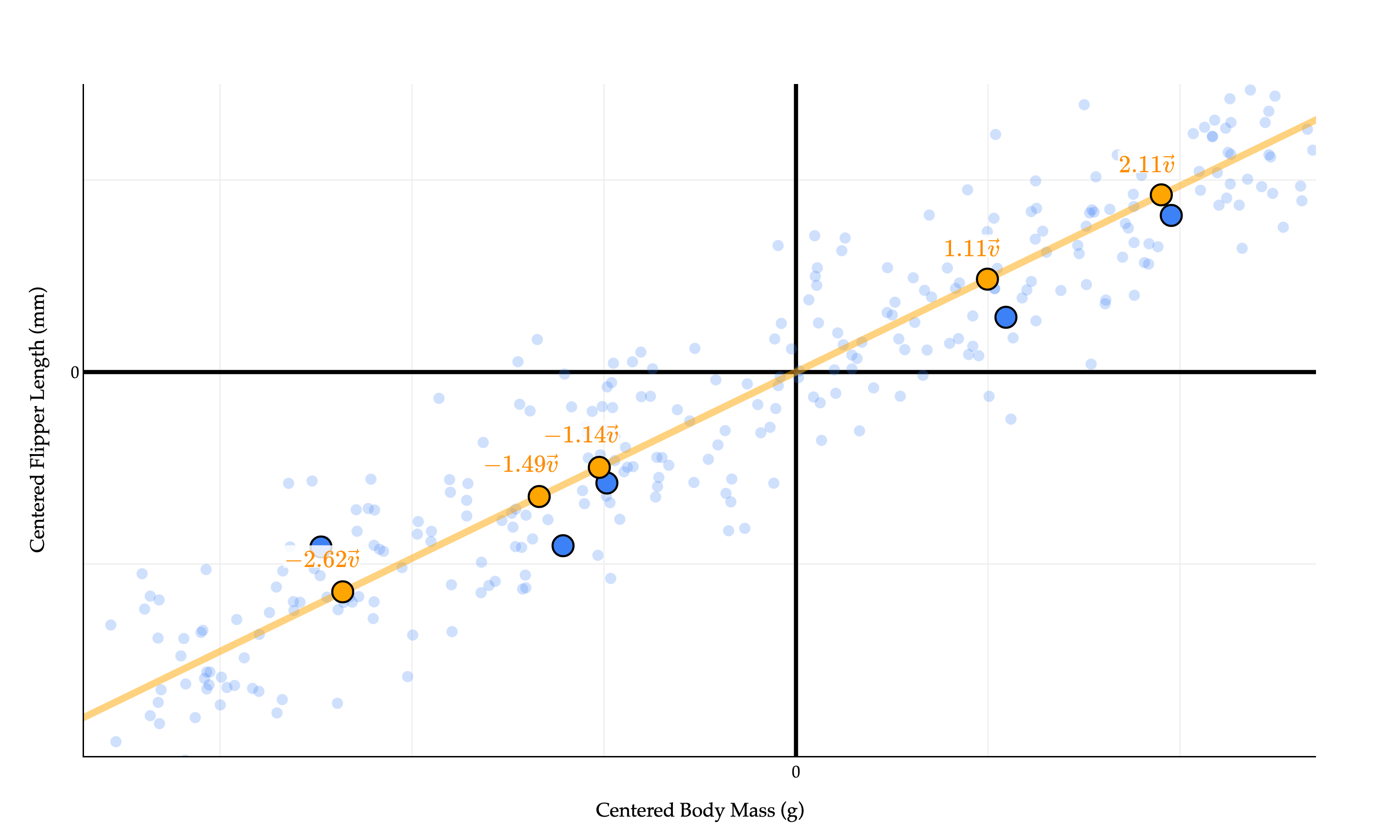
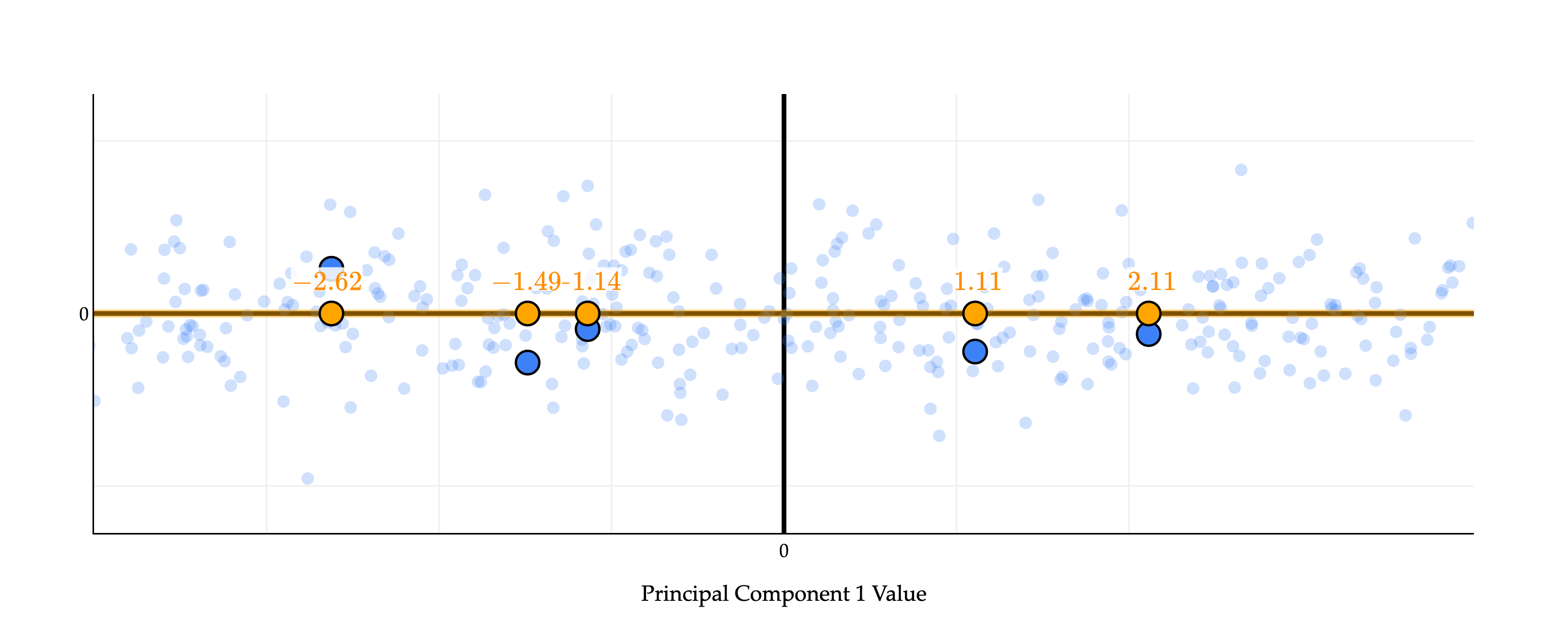
The values x~1⋅v,x~2⋅v,…,x~n⋅v – −2.62, −1.49, −1.14, −1.11, and 2.11 above – describe the position of point x~i on the line defined by v. (I’ve highlighted just five of the points to make the picture less cluttered, but in reality every single blue point has a corresponding orange dot above!)
These coefficients on v can be thought of as positions on a number line.
import pandas as pd
import plotly.graph_objects as go
import numpy as np

# Use the same synthetic data as above, so the aspect is "fair"
np.random.seed(102)
num_points = 340
body_mass_g = np.random.uniform(2700, 6300, num_points)
m_true = 0.015
c_true = 120
noise = np.random.normal(0, 5, num_points)
flipper_length_mm = m_true * body_mass_g + c_true + noise

df = pd.DataFrame({
    'body_mass_g': body_mass_g,
    'flipper_length_mm': flipper_length_mm
})

# Standardize both columns to mean=0, std=1 for correct orthogonal aspect
df['body_mass_std'] = (df['body_mass_g'] - df['body_mass_g'].mean()) / df['body_mass_g'].std()
df['flipper_length_std'] = (df['flipper_length_mm'] - df['flipper_length_mm'].mean()) / df['flipper_length_mm'].std()
X = df[['body_mass_std', 'flipper_length_std']].values
X[:, 0] *= 2 # Scale x-axis for visual effect (as in original)

count_show = 5

# Fix the randomness: pick 5 random indices, keep correspondence for projections
rng = np.random.default_rng(51)
indices = rng.choice(len(X), replace=False, size=count_show)
X_subset = X[indices]   # shape (5, 2)

# Get best-fit direction using SVD/PCA
U, S, Vt = np.linalg.svd(X, full_matrices=False)
direction = Vt[0]
direction = -direction / np.linalg.norm(direction)

# Now rotate the whole dataset so that the principal component is horizontal
theta = np.arctan2(direction[1], direction[0])
R = np.array([[np.cos(-theta), -np.sin(-theta)],
              [np.sin(-theta),  np.cos(-theta)]])
X_rot = X @ R.T
X_subset_rot = X_subset @ R.T

# The "principal component direction" after rotation is along the x-axis: [1, 0]
# So projections onto the orange line map to (tx, 0)
ts = X_subset_rot[:, 0]  # The coordinate along principal component
proj_points_rot = np.column_stack([ts, np.zeros_like(ts)])

# For labeling: pick 5 random points (from 5), annotate with their scalar times v
label_indices = rng.choice(count_show, size=count_show, replace=False)
label_indices = np.sort(label_indices)

# Plot setup with all standardized points (faded)
fig = go.Figure()
fig.add_trace(go.Scatter(
    x=X_rot[:,0], y=X_rot[:,1],
    mode='markers',
    marker=dict(color="#3D81F6", size=8, opacity=0.25),
    showlegend=False,
    hoverinfo='skip'
))

# Scatter for the selected 5 points (emphasized)
fig.add_trace(go.Scatter(
    x=X_subset_rot[:,0], y=X_subset_rot[:,1],
    mode='markers',
    marker=dict(color="#3D81F6", size=13),
    name="5 Random Points",
    showlegend=False
))

# Principal component line (horizontal, pass through origin), extended to cover full range
proj_min = X_rot[:, 0].min()
proj_max = X_rot[:, 0].max()
pc_extend = 0.20 * (proj_max - proj_min)
line_range = np.array([proj_min - pc_extend, proj_max + pc_extend])
line_pts = np.column_stack([line_range, [0, 0]])

fig.add_trace(go.Scatter(
    x=line_pts[:,0], y=line_pts[:,1],
    mode='lines',
    line=dict(color="orange", width=5, dash='solid'),
    opacity=0.5,
    name="Principal Component"
))

# Scatter for projection points (small orange dots)
fig.add_trace(go.Scatter(
    x=proj_points_rot[:,0], y=proj_points_rot[:,1],
    mode='markers',
    marker=dict(color="orange", size=13),
    name="Projections",
    showlegend=False
))

# Original Points (Blue with thin black outline)
fig.add_trace(go.Scatter(
    x=X_subset_rot[label_indices, 0], y=X_subset_rot[label_indices, 1],
    mode='markers',
    marker=dict(color="#3D81F6", size=15, line=dict(width=1.5, color='black')),
    name="Annotated Original Points",
    showlegend=False
))

# Projection Points (Orange with thin black outline)
fig.add_trace(go.Scatter(
    x=proj_points_rot[label_indices, 0], y=proj_points_rot[label_indices, 1],
    mode='markers',
    marker=dict(color="orange", size=15, line=dict(width=1.5, color='black')),
    name="Annotated Projection Points",
    showlegend=False
))

# # Draw orthogonal lines from each selected point to its projection
# for i in range(count_show):
#     fig.add_trace(go.Scatter(
#         x=[X_subset_rot[i,0], proj_points_rot[i,0]],
#         y=[X_subset_rot[i,1], proj_points_rot[i,1]],
#         mode='lines',
#         line=dict(color="#d81a60", width=2, dash='dot'),
#         showlegend=False,
#         hoverinfo='skip'
#     ))

# Annotate 5 random projection points with near-label (scalar times v)
arrow_offset = 0.2 # Smaller offset for "short arrows"
for label_i, idx in enumerate(label_indices):
    ti = ts[idx]
    px, py = proj_points_rot[idx]
    coef = np.round(ti, 2)
    # Perpendicular direction (for offset): [0,1] since the line is horizontal
    perp = np.array([0, 1])
    label_offset = arrow_offset * perp
    ax = px + label_offset[0]
    ay = py + label_offset[1]
    # Formatting for - sign spacing like LaTeX, e.g. "-3.2 \vec v"
    if coef >= 0:
        label = rf"${coef}$"
    else:
        label = rf"$-{abs(coef)}$"
    fig.add_annotation(
        x=ax, y=ay,
        ax=ax, ay=ay,
        text=label,
        showarrow=True,
        arrowhead=6, # Changed arrowhead to 6
        arrowsize=0.7,
        arrowcolor="orange",
        arrowwidth=1.2,
        font=dict(family="Palatino Linotype, Palatino, serif", size=17, color='darkorange'),
        bgcolor="rgba(255,255,255,0.85)",
        opacity=1
    )

# Aspect ratio 1:1 to make orthogonality look correct
all_x = np.concatenate([X_rot[:,0], proj_points_rot[:,0]])
all_y = np.concatenate([X_rot[:,1], proj_points_rot[:,1]])
margin_x = 0.2 * (all_x.max() - all_x.min())
margin_y = 0.2 * (all_y.max() - all_y.min())
fig.update_xaxes(
    title='Standardized Body Mass (Rotated)',
    gridcolor='#f0f0f0',
    showline=True,
    linecolor="black",
    linewidth=1,
    zeroline=True,
    zerolinewidth=3,
    zerolinecolor="black",
    range=[all_x.min()-margin_x, all_x.max()+margin_x],
    scaleanchor='y',  # lock aspect
    scaleratio=1
)
fig.update_yaxes(
    title='Standardized Flipper Length (Rotated)',
    gridcolor='#f0f0f0',
    showline=True,
    linecolor="black",
    linewidth=1,
    zeroline=True,
    zerolinewidth=3,
    zerolinecolor="black",
    range=[all_y.min()-margin_y, all_y.max()+margin_y]
)

fig.update_layout(
    showlegend=False,
    plot_bgcolor='white',
    paper_bgcolor='white',
    margin=dict(l=60, r=60, t=60, b=60),
    width=1000,
    height=400,
    font=dict(
        family="Palatino Linotype, Palatino, serif",
        color="black"
    ),
    xaxis_range=[-4, 4],
    yaxis_range=[-1, 1],
    xaxis=dict(
        title='Principal Component 1 Value',
        tickvals=[-3, -2, -1, 0, 1, 2],
        ticktext=['', '', '', 0, '', '']
    ),
    yaxis=dict(
        title='',
        tickvals=[-2, -1, 0, 1, 1.5],
        ticktext=['', '', 0, '', '']
    )
)
fig.show(renderer='png', scale=3)
Effectively, we’ve rotated the data so that the orange points are on the “new” x-axis. (Rotations... where have we heard of those before? The connection is coming.)
So, we have a grasp of what the values x~1⋅v,x~2⋅v,…,x~n⋅v describe. But why are they important?
The quantity we’re trying to maximize,
n1i=1∑n(x~i⋅v)2
is the variance of the values x~1⋅v,x~2⋅v,…,x~n⋅v. It’s not immediately obvious why this is the case. Remember, the variance of a list of numbers is
n1i=1∑n(valuei−mean)2
(I’m intentionally using vague notation to avoid conflating singular values with standard deviations.)
The quantity n1∑i=1n(x~i⋅v)2 resembles this definition of variance, but it doesn’t seem to involve a subtraction by a mean. This is because the mean of x~1⋅v,x~2⋅v,…,x~n⋅v is 0! This seems to check out visually above: it seems that if we found the corresponding orange point for every single blue point, the orange points would be symmetrically distributed around 0.
Proof that the mean of x~1⋅v,x~2⋅v,…,x~n⋅v is 0
Recall that each x~i is a vector in Rd and corresponds to a row in X~. The values x~1⋅v,x~2⋅v,…,x~n⋅v can all be computed at once through the matrix-vector product X~v (remember that to multiply a matrix by a vector, we dot product the rows of the matrix with the vector).
The columns of X~ each have a mean of 0. As we discovered in Activity 2, this means that
X~T1=⎣⎡sum of column 1 of X~sum of column 2 of X~⋮sum of column d of X~⎦⎤=⎣⎡00⋮0⎦⎤=0d
if 1∈Rn is a vector of all ones.
So, what is the mean of the values x~1⋅v,x~2⋅v,…,x~n⋅v? This mean, by definition, is n1∑i=1nx~i⋅v, but this is equalx to n1(1T(X~v)), once again, using the fact that the dot product with the ones vector is equivalent to summing the values of the other vector.
So, the mean of the values x~1⋅v,x~2⋅v,…,x~n⋅v is 0.
Since the mean of the values x~1⋅v,x~2⋅v,…,x~n⋅v is 0, it is true that the quantity we’re maximizing is the variance of the values x~1⋅v,x~2⋅v,…,x~n⋅v, which I’ll refer to as
PV(v)=n1i=1∑n(x~i⋅v)2
PV stands for “projected variance”; it is the variance of the scalar projections of the rows of X~ onto v. This is non-standard notation, but I wanted to avoid calling this the “variance of v”, since it’s not the variance of the components of v.
We’ve stumbled upon a beautiful duality – that is, two equivalent ways to think about the same problem. Given a centered n×d matrix X~ with rows x~i∈Rd, the most important directionv is the one that
Minimizes the mean squared orthogonal error of projections onto it,
J(v)=n1i=1∑n∥x~i−pi∥2
Equivalently, maximizes the variance of the projected values x~i⋅v, i.e. maximizes
PV(v)=n1i=1∑n(x~i⋅v)2
Minimizing orthogonal error is equivalent to maximizing variance: don’t forget this. In the widget below, drag the slider to see this duality in action: the shorter the orthogonal errors tend to be, the more spread out the orange points tend to be (meaning their variance is large). When the orange points are close together, the orthogonal errors tend to be quite large.
import pandas as pd
import plotly.graph_objects as go
import numpy as np

# Use the same synthetic data as above
np.random.seed(102)
num_points = 340
body_mass_g = np.random.uniform(2700, 6300, num_points)
m_true = 0.015
c_true = 120
noise = np.random.normal(0, 5, num_points)
flipper_length_mm = m_true * body_mass_g + c_true + noise

df = pd.DataFrame({
    'body_mass_g': body_mass_g,
    'flipper_length_mm': flipper_length_mm
})

df['body_mass_std'] = (df['body_mass_g'] - df['body_mass_g'].mean()) / df['body_mass_g'].std()
df['flipper_length_std'] = (df['flipper_length_mm'] - df['flipper_length_mm'].mean()) / df['flipper_length_mm'].std()
X = df[['body_mass_std', 'flipper_length_std']].values
X[:, 0] *= 2 # Scale x-axis for visual effect

count_show = 20

# Fix the randomness: pick 5 fixed indices
rng = np.random.default_rng(51)
indices = rng.choice(len(X), replace=False, size=count_show)
X_subset = X[indices]

# Get best-fit direction using SVD/PCA for computing optimal angle
U, S, Vt = np.linalg.svd(X, full_matrices=False)
opt_direction = Vt[0]
opt_direction = opt_direction / np.linalg.norm(opt_direction)
opt_theta = np.arctan2(opt_direction[1], opt_direction[0])  # in radians; in [-pi, pi]

# Helper for 360-degree range, always positive
def wrap_angle(theta):  # ensure [0, 2pi)
    return (theta + 2 * np.pi) % (2 * np.pi)

# For displaying the line as in plotly (a segment through the origin)
def make_line_pts(theta, vmin, vmax, extend=0.2):
    """Returns 2 points defining a line through origin with direction theta."""
    direction = np.array([np.cos(theta), np.sin(theta)])
    # Extend the min/max a bit for better plot
    range_min = vmin - extend * (vmax - vmin)
    range_max = vmax + extend * (vmax - vmin)
    xs = [range_min * direction[0], range_max * direction[0]]
    ys = [range_min * direction[1], range_max * direction[1]]
    return np.array([xs, ys]).T

# Function to project points onto a line at angle theta through (0,0)
def get_projections(X_pts, theta):
    direction = np.array([np.cos(theta), np.sin(theta)])
    direction = direction / np.linalg.norm(direction)
    ts = X_pts @ direction  # projections as scalars
    proj_points = np.outer(ts, direction)
    return proj_points

# Precompute range for line plotting (so all lines look visually similar)
vals_for_range = np.concatenate([X[:,0], X[:,1]])
vabs = np.max(np.abs(vals_for_range))
vmin, vmax = -vabs, vabs

# Slider construction
from plotly.subplots import make_subplots

# We'll build thetas so that index 0 is always the optimal, with slider ranging -360 to +360
n_steps = 181
thetas = np.linspace(-np.pi, np.pi, n_steps) + opt_theta  # centers thetas at opt_theta, from -360° to +360°
theta_labels = [f"{int(np.round(np.degrees(theta - opt_theta))):+d}°" for theta in thetas]  # ticks -360 to +360
# The optimal direction (opt_theta) is at index n_steps//2
start_ix = n_steps // 2

# Compute plot bounds
xlim = (-3, 2)
ylim = (-2, 1.5)
# axis ticks for styling
xticks = [-3, -2, -1, 0, 1, 2]
xticktext = ['', '', '', 0, '', '']
yticks = [-2, -1, 0, 1, 1.5]
yticktext = ['', '', 0, '', '']

# Make the figure with a first frame (at optimal PC direction)
def make_frame(theta):
    # Compute direction
    direction = np.array([np.cos(theta), np.sin(theta)])
    # Orange projection points for the 5
    proj_points = get_projections(X_subset, theta)
    # Line covering whole range
    line_seg = make_line_pts(theta, vmin, vmax)
    # Build traces
    traces = []
    # All standardized points, faded
    traces.append(go.Scatter(
        x=X[:,0], y=X[:,1],
        mode='markers',
        marker=dict(color="#3D81F6", size=8, opacity=0.25),
        showlegend=False,
        hoverinfo='skip'
    ))
    # Blue subset points (fixed)
    traces.append(go.Scatter(
        x=X_subset[:,0], y=X_subset[:,1],
        mode='markers',
        marker=dict(color="#3D81F6", size=13),
        name="5 Points",
        showlegend=False
    ))
    # Orange projection points
    traces.append(go.Scatter(
        x=proj_points[:,0], y=proj_points[:,1],
        mode='markers',
        marker=dict(color="orange", size=13),
        name="Projections",
        showlegend=False
    ))
    # Principal direction line
    traces.append(go.Scatter(
        x=line_seg[:,0], y=line_seg[:,1],
        mode='lines',
        line=dict(color="orange", width=5, dash='solid'),
        opacity=0.5,
        name="Direction"
    ))
    # Dashed lines for errors (one per blue point)
    for i in range(count_show):
        traces.append(go.Scatter(
            x=[X_subset[i,0], proj_points[i,0]],
            y=[X_subset[i,1], proj_points[i,1]],
            mode='lines',
            line=dict(color="#d81a60", width=2, dash='dot'),
            showlegend=False,
            hoverinfo='skip'
        ))
    return traces

# Build frames for animation
frames = []
for ti, theta in enumerate(thetas):
    traces = make_frame(theta)
    frame = go.Frame(
        data=traces,
        name=str(ti),
        traces=list(range(len(traces)))
    )
    frames.append(frame)

# Initial figure (at theta=0, so slider starts at optimal)
init_traces = make_frame(thetas[start_ix])
fig = go.Figure(data=init_traces, frames=frames)

# Set up slider to control theta, labeled -360 to +360, starting at 0
steps = []
for i, theta in enumerate(thetas):
    label = theta_labels[i]
    step = dict(
        method="animate",
        args=[
            [str(i)],
            {"mode": "immediate", "frame": {"duration": 0, "redraw": True}, "transition": {"duration": 0}}
        ],
        label=label
    )
    steps.append(step)

sliders = [dict(
    steps=steps,
    active=start_ix,
    transition={'duration': 0},
    x=0.2, y=0.01,
    currentvalue=dict(
        font=dict(size=18),
        prefix="θ (angle from optimum): ",
        visible=True,
        xanchor='center'
    ),
    len=0.75
)]

fig.update_layout(
    sliders=sliders,
    showlegend=False,
    plot_bgcolor='white',
    paper_bgcolor='white',
    margin=dict(l=60, r=60, t=60, b=60),
    width=650,
    height=525,
    font=dict(
        family="Palatino Linotype, Palatino, serif",
        color="black"
    ),
    xaxis_range=list(xlim),
    yaxis_range=list(ylim),
    xaxis=dict(
        # title='Centered Body Mass (g)',
        tickvals=xticks,
        ticktext=xticktext,
        gridcolor='#f0f0f0',
        showline=True,
        linecolor="black",
        linewidth=1,
        zeroline=True,
        zerolinewidth=3,
        zerolinecolor="black"
    ),
    yaxis=dict(
        # title='Centered Flipper Length (mm)',
        tickvals=yticks,
        ticktext=yticktext,
        gridcolor='#f0f0f0',
        showline=True,
        linecolor="black",
        linewidth=1,
        zeroline=True,
        zerolinewidth=3,
        zerolinecolor="black"
    ),
    title="The shorter the <span style='color:#d81a60'>orthogonal errors</span> are, the more spread out the <span style='color:orange'>orange points</span> are!"
)

fig.show()
Minimizing mean squared orthogonal error is a useful goal: this brings our 1-dimensional approximation of the data as close as possible to the original data. Why is maximizing variance another useful goal?
Here’s an analogy: suppose I had a dataset with several characteristics about each student in this course, and I needed to come up with a single number to describe each student. Perhaps I’d take some weighted combination of the number of lectures they’ve attended, their Midterm 1 and Midterm 2 scores, and the number of office hours they’ve attended. I wouldn’t factor in the number of semesters they’ve been at Michigan, since this number is likely to be similar across all students, while these other characteristics vary more significantly.
The guiding philosophy here is that variance is information. I want to come up with a linear combination of features that remains as different as possible across different data points, as this will allow me to distinguish between different data points, i.e. most faithfully represent the data, while being in a lower-dimensional space.
Okay, so we know that minimizing mean squared orthogonal error is equivalent to maximizing variance. Presumably, this interpretation will help us in our quest of finding the most important direction, v.
Again, we want to maximize
PV(v)=n1i=1∑n(x~i⋅v)2
PV(v) is a vector-to-scalar function; it takes in vectors in Rd and returns a scalar. So, to maximize it, we’d need to take its gradient with respect to v. (The same would have been true if we wanted to minimize the mean squared orthogonal error – we’d need to have taken the gradient of J(v). The point of highlighting the duality above, in addition to helping build intuition, was to address the fact that J(v) doesn’t have a simple gradient, but PV(v) does.)
Is there a way we can write PV(v) in a way that would allow us to apply the gradient rules we developed in Chapter 4? Using the observation that the values x~1⋅v,x~2⋅v,…,x~n⋅v are all components of the matrix-vector product X~v, we can rewrite PV(v) as
PV(v)=n1∥X~v∥2
which can further be simplified to
PV(v)=n1vTX~TX~v
Now, we can apply the gradient rules in Chapter 4 – specifically, the quadratic form rule – to find ∇PV(v). But, there’s something we’ve forgotten. Let’s take a step back.
Remember, v must be a unit vector! All of the optimization problems we’ve seen so far in this course have been unconstrained, meaning that there were never restrictions on what the optimal solutions could be. This is our first time encountering a constrained optimization problem. We can write this optimization problem as
maxsubject ton1∥X~v∥2∥v∥=1
If we don’t constrain v to be a unit vector, then PV(v) is unbounded: the larger I make the components in v, the larger PV(v) becomes.
One general solution for solving constrained optimization problems is to use the method Lagrange multipliers, which are typically covered in a Calculus 3 course. We won’t cover this approach here. Instead, we’ll use another approach that works for this specific problem. Instead of maximizing
PV(v)=n1∥X~v∥2
we’ll maximize a related function that automatically constrains v to be a unit vector, without us having to write a constraint.
f(v)=∥v∥2∥X~v∥2
Why is maximizing f(v) equivalent to maximizing PV(v) with the unit vector constraint?
First, note that the factor of n1 from PV(v) has been dropped: maximizing n1∥X~v∥2 is equivalent to maximizing ∥X~v∥2. The same vector wins in both cases. So, for convenience, we’ll drop the n1 for now.
Now, suppose v is a unit vector. Then, ∥v∥2=1, so f(v)=∥X~v∥2.
If v is not a unit vector, then v=cu, where u is some unit vector. But then
which means that f(v)=f(u), i.e. f(v) is equal to f applied to a unit vector with the same direction as v.
Dividing by ∥v∥2 effectively neutralizes the effect of the length of v and instead focuses on the direction of v, which is precisely what we’re looking for.
Now, our problem is to find the vector v that maximizes
f(v)=∥v∥2∥X~v∥2
Here’s the big idea: we’ve seen this function before! Specifically, in Homework 9, Problem 4, you studied the Rayleigh quotient, which is the function
g(v)=vTvvTAv
for a symmetric n×n matrix A. There, you showed that the gradient of g(v) is given by
∇g(v)=vTv2(Av−g(v)v)
Which vector v maximizes g(v)? If v maximizes g(v), then ∇g(v)=0.
vTv2(Av−g(v)v)=0⟹Av−g(v)v=0⟹Av=g(v)v
What this is saying is that if ∇g(v)=0, then v is an eigenvector of A!
As an example – and this is a total diversion from the main storyline of the lecture, but it’s an important one – let’s visualize the Rayleigh quotient for the symmetric 2×2 matrix
A=[1551]
If we let v=[xy], then this Rayleigh quotient is
g(v)=vTvvTAv=x2+y2x2+10xy+y2
I have visualized it as a contour plot, a concept we first encountered in Chapter 4.1.
import numpy as np
import plotly.graph_objs as go

# Define the matrix A
A = np.array([[1, 5],
              [5, 1]])

# Define the grid of v1, v2 values
v1 = np.linspace(-5, 5, 400)
v2 = np.linspace(-5, 5, 400)
V1, V2 = np.meshgrid(v1, v2)
Z = np.zeros_like(V1)

# Compute the Rayleigh quotient for each (v1, v2) pair, avoid division by zero
for i in range(V1.shape[0]):
    for j in range(V1.shape[1]):
        v = np.array([V1[i, j], V2[i, j]])
        denominator = np.dot(v, v)
        if denominator != 0:
            numerator = v.T @ A @ v
            Z[i, j] = numerator / denominator
        else:
            Z[i, j] = np.nan  # Avoid division by zero

# Plot a contour plot using plotly
fig = go.Figure(
    data=go.Contour(
        z=Z,
        x=v1,
        y=v2,
        colorscale='RdBu_r',
        contours=dict(
            coloring='heatmap',
            showlabels = True
        ),
        colorbar=dict(title='Rayleigh Quotient')
    )
)

fig.update_layout(
    title='Rayleigh Quotient Contour for A=[[1, 5], [5, 1]]',
    font=dict(family='Palatino, serif', color='#222'),
    xaxis_title='x',
    yaxis_title='y',
    paper_bgcolor='white',
    plot_bgcolor='white',
    width=600,
    height=600
)
fig.show()
Loading...
Dark red regions correspond to the highest values of the Rayleigh quotient, and dark blue regions correspond to the lowest values. You’ll notice that the darkest red and darkest blue regions form lines: these lines are the directions of the eigenvectors of A! The corresponding outputs along those lines are the eigenvalues of A. Take a look at the scale on the colorbar: the graph maxes out at 6, which is the largest eigenvalue of A, and its minimum is -4, which is the smallest eigenvalue of A.
So, the fact that
∇g(v)=0⟹Av=g(v)v
means that:
the vector that maximizes g(v)=vTvvTAv is the eigenvector of A corresponding to the largest eigenvalue of A, and
the vector that minimizes g(v) is the eigenvector of A corresponding to the smallest eigenvalue of A!
How does this relate to our problem, of finding the vector that maximizes PV(v), which is the same vector that maximizes
f(v)=∥v∥2∥X~v∥2
?
Here’s the key: Our f(v) is a Rayleigh quotient, where A=X~TX~.
f(v)=∥v∥2∥X~v∥2=vTvvTX~TX~v
X~TX~ is a symmetric matrix, so everything we know about the Rayleigh quotient applies. That is,
∇f(v)=vTv2(X~TX~v−f(v)v)
and
if v is a critical point, it must be an eigenvector of X~TX~∇f(v)=0⟹X~TX~v=f(v)v
Using the same reasoning as before, the vector that maximizes f(v) is the eigenvector of X~TX~ corresponding to the largest eigenvalue of X~TX~!
What does this really mean?
import pandas as pd
import plotly.graph_objects as go
import numpy as np

# Use the same synthetic data as above, so the aspect is "fair"
np.random.seed(102)
num_points = 340
body_mass_g = np.random.uniform(2700, 6300, num_points)
m_true = 0.015
c_true = 120
noise = np.random.normal(0, 5, num_points)
flipper_length_mm = m_true * body_mass_g + c_true + noise

df = pd.DataFrame({
    'body_mass_g': body_mass_g,
    'flipper_length_mm': flipper_length_mm
})

# Standardize both columns to mean=0, std=1 for correct orthogonal aspect
df['body_mass_std'] = (df['body_mass_g'] - df['body_mass_g'].mean()) / df['body_mass_g'].std()
df['flipper_length_std'] = (df['flipper_length_mm'] - df['flipper_length_mm'].mean()) / df['flipper_length_mm'].std()
X = df[['body_mass_std', 'flipper_length_std']].values
X[:, 0] *= 2 # Scale x-axis for visual effect (as in original)

# Get best-fit direction using SVD/PCA
U, S, Vt = np.linalg.svd(X, full_matrices=False)
direction = Vt[0]
direction = direction / np.linalg.norm(direction)

# Plot setup with all standardized points (higher opacity)
fig = go.Figure()
fig.add_trace(go.Scatter(
    x=X[:,0], y=X[:,1],
    mode='markers',
    marker=dict(color="#3D81F6", size=8, opacity=0.75),
    showlegend=False,
    hoverinfo='skip'
))

# Principal component line (covers full range, faded)
proj_min = X @ direction
pc_min, pc_max = proj_min.min(), proj_min.max()
pc_extend = 0.20 * (pc_max - pc_min)
line_range = np.array([pc_min - pc_extend, pc_max + pc_extend])
line_pts = np.outer(line_range, direction)

fig.add_trace(go.Scatter(
    x=line_pts[:,0], y=line_pts[:,1],
    mode='lines',
    line=dict(color="orange", width=5, dash='solid'),
    opacity=0.5,
    name="Principal Component"
))

# Draw a unit vector along the principal component, centered at (0, 0)
unit_length = 1   # visibly "unit", can be adjusted if needed
vec_start = np.array([0.0, 0.0])
vec_end = -direction * unit_length

fig.add_trace(go.Scatter(
    x=[vec_start[0], vec_end[0]],
    y=[vec_start[1], vec_end[1]],
    mode="lines",
    line=dict(color="orange", width=7),
    marker=dict(color="orange", size=[0, 24]), # marker at tip
    showlegend=False
))

# Add arrowhead using annotation (to visually mark vector tip)
fig.add_annotation(
    x=vec_end[0]-0.07*direction[0], # a bit before tip, so arrow doesn't overshoot marker
    y=vec_end[1]-0.07*direction[1],
    ax=vec_start[0],
    ay=vec_start[1],
    xref="x", yref="y", axref="x", ayref="y",
    text="",
    arrowhead=3,
    arrowsize=1.3,
    arrowwidth=3,
    arrowcolor="orange",
    standoff=0,
    opacity=1,
    showarrow=True
)

# Annotate the vector with label \vec v_1
# Place label a little past the tip in the same direction
label_offset = 0.15
fig.add_annotation(
    x=vec_end[0] + label_offset * direction[0] * (-6),
    y=vec_end[1] + 3 * label_offset * direction[1],
    text=r"$\vec{v}_1, \text{the eigenvector of } \tilde X^T \tilde X \\ \text{ corresponding to the largest eigenvalue}$",
    showarrow=False,
    font=dict(
        family="Palatino Linotype, Palatino, serif",
        size=40,
        color='darkorange'
    ),
    bgcolor="rgba(255,255,255,0.82)",
    opacity=1
)

# Aspect ratio 1:1 to make orthogonality look correct
margin_x = 0.2 * (X[:,0].max() - X[:,0].min())
margin_y = 0.2 * (X[:,1].max() - X[:,1].min())
fig.update_xaxes(
    title='Standardized Body Mass',
    gridcolor='#f0f0f0',
    showline=True,
    linecolor="black",
    linewidth=1,
    zeroline=True,
    zerolinewidth=3,
    zerolinecolor="black",
    range=[X[:,0].min()-margin_x, X[:,0].max()+margin_x],
    scaleanchor='y',  # lock aspect
    scaleratio=1
)
fig.update_yaxes(
    title='Standardized Flipper Length',
    gridcolor='#f0f0f0',
    showline=True,
    linecolor="black",
    linewidth=1,
    zeroline=True,
    zerolinewidth=3,
    zerolinecolor="black",
    range=[X[:,1].min()-margin_y, X[:,1].max()+margin_y]
)

fig.update_layout(
    showlegend=False,
    plot_bgcolor='white',
    paper_bgcolor='white',
    margin=dict(l=60, r=60, t=60, b=60),
    width=1000,
    height=600,
    font=dict(
        family="Palatino Linotype, Palatino, serif",
        color="black"
    ),
    xaxis_range=[-1, 2],
    yaxis_range=[-1, 1.5],
    xaxis=dict(
        title='Centered Body Mass (g)',
        tickvals=[-3, -2, -1, 0, 1, 2],
        ticktext=['', '', '', 0, '', '']
    ),
    yaxis=dict(
        title='Centered Flipper Length (mm)',
        tickvals=[-2, -1, 0, 1, 1.5],
        ticktext=['', '', 0, '', '']
    )
)
fig.show(renderer='png', scale=3)
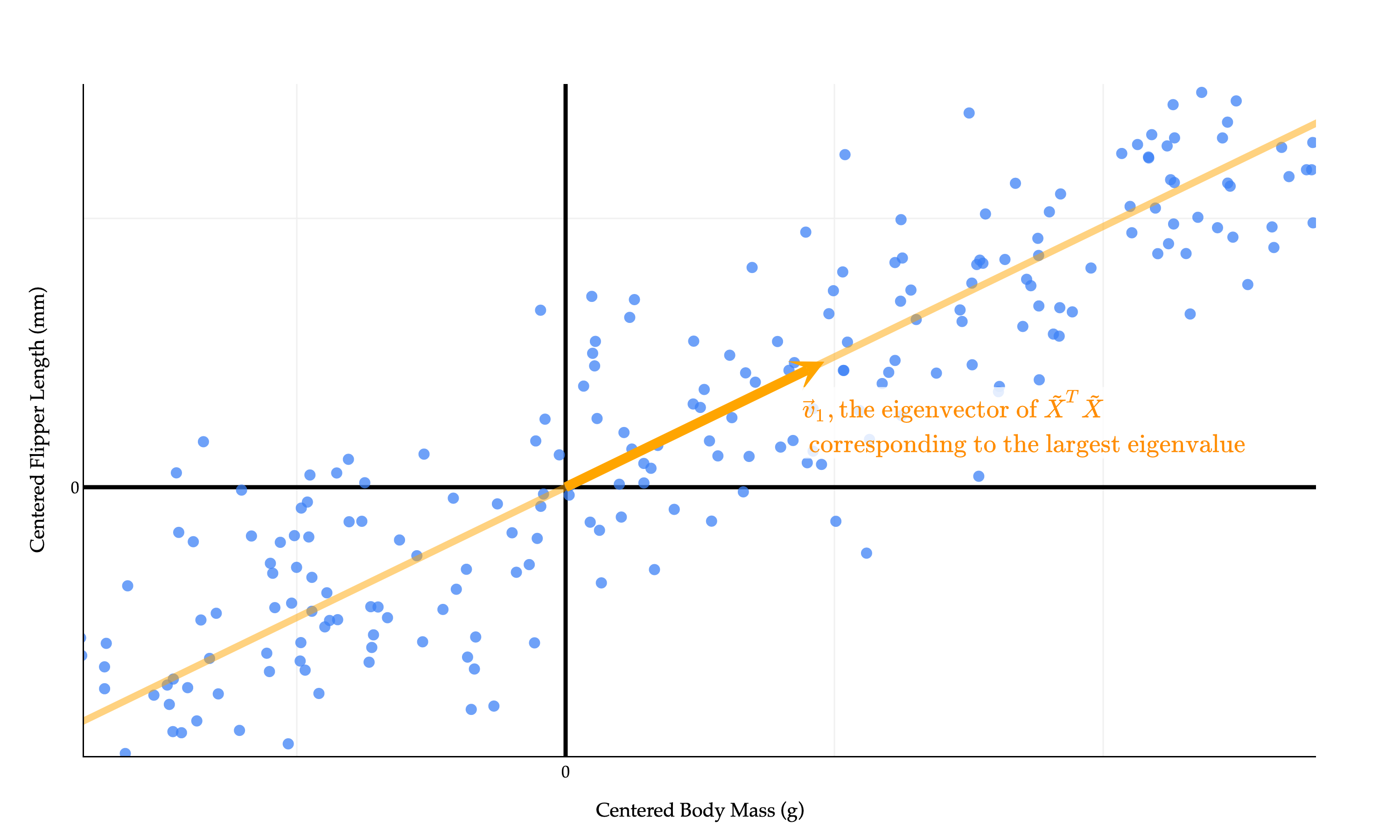
It says that the line that maximizes the variance of the projected data – which is also the line that minimizes the mean squared orthogonal error – is spanned by the eigenvector of X~TX~ corresponding to the largest eigenvalue of X~TX~.
We’ve discovered that the single best direction to project the data onto is the eigenvector of X~TX~ corresponding to the largest eigenvalue of X~TX~. Let’s call this eigenvector v1, as I did in the diagram above. More v’s are coming.
PV(v)=n1∥X~v∥2⟹v∗=v1
The values of the first principal component, PC1 (i.e. new feature 1), come from projecting each row of X~ onto v1:
PC1=⎣⎡x~1⋅v1x~2⋅v1⋮x~n⋅v1⎦⎤=X~v1
This projection of our data onto the line spanned by v1 is the linear combination of the original features that captures the largest possible amount of variance in the data.
(Whenever you see “principal component”, you should think “new feature”.)
Remember, one of our initial goals was to find multiple principal components that were uncorrelated with each other, meaning their correlation coefficient r is 0. We’ve found the first principal component, PC1, which came from projecting onto the best direction. This is the single best linear combination of the original features we can come up with.
Let’s take a greedy approach. I now want to find the next best principal component, PC2, which should be uncorrelated with PC1. PC2 should capture all of the remaining variance in the data that PC1 couldn’t capture. Intuitively, since our dataset is 2-dimensional, together, PC1 and PC2 should contain the same information as the original two features.
PC2 comes from projecting onto the best direction among all directions that are orthogonal to v1. It can be shown that this “second-best direction” is the eigenvector v2 of X~TX~ corresponding to the second largest eigenvalue of X~TX~.
PC2=X~v2
In other words, the vector v that maximizes f(v)=∥v∥2∥X~v∥2 subject to the constraint that v is orthogonal to v1, is v2. The proof of this is beyond the scope of what we’ll discuss here, as it involves some constrained optimization theory.
Why is v2 orthogonal to v1? They are both eigenvectors of X~TX~ corresponding to different eigenvalues, so they must be orthogonal, thanks to the spectral theorem (which applies because X~TX~ is symmetric). Remember that while any vector on the line spanned by v2 is also an eigenvector of X~TX~ corresponding to the second largest eigenvalue, we pick the specific v2 that is a unit vector.
v2 and v1 being orthogonal means that X~v2 and X~v1 are orthogonal, too. But because the columns of X~ are mean centered, we can show that this implies that the correlation between PC1 and PC2 is 0. I’ll save the algebra for now, but see if you can work this out yourself. You’ve done similar proofs in homeworks already.
is the singular value decomposition of X~, then the columns of V are the eigenvectors of X~TX~, all of which are orthogonal to each other and have unit length.
We arranged the components in the singular value decomposition in decreasing order of singular values of X~, which are the square roots of the eigenvalues of X~TX~.
σi=λi,where λi is the i-th largest eigenvalue of X~TX~
So,
the first column of V is v1, the “best direction” to project the data onto,
the second column of V is v2, the “second-best direction” to project the data onto,
the third column of V is v3, the “third-best direction” to project the data onto,
Let’s start with the 2-dimensional dataset of flipper length vs. body mass from the penguins dataset.
import numpy as np
import pandas as pd
import plotly.graph_objects as go
from plotly.subplots import make_subplots

# Use the same synthetic data as above, so the aspect is "fair"
np.random.seed(102)
num_points = 340
body_mass_g = np.random.uniform(2700, 6300, num_points)
m_true = 0.015
c_true = 120
noise = np.random.normal(0, 5, num_points)
flipper_length_mm = m_true * body_mass_g + c_true + noise

df = pd.DataFrame({
    'body_mass_g': body_mass_g,
    'flipper_length_mm': flipper_length_mm
})

# Standardize both columns to mean=0, std=1 for correct orthogonal aspect
df['body_mass_std'] = (df['body_mass_g'] - df['body_mass_g'].mean()) / df['body_mass_g'].std()
df['flipper_length_std'] = (df['flipper_length_mm'] - df['flipper_length_mm'].mean()) / df['flipper_length_mm'].std()
X = df[['body_mass_std', 'flipper_length_std']].values
X[:, 0] *= 2 # Scale x-axis for visual effect (as in original)

# Center the data
X_mean = np.mean(X, axis=0)
X_centered = X - X_mean

# SVD/PCA for centered data
U, S, Vt = np.linalg.svd(X_centered, full_matrices=False)
U = -U
Vt = -Vt
direction1 = Vt[0] / np.linalg.norm(Vt[0])
direction2 = Vt[1] / np.linalg.norm(Vt[1])

# Project data into principal components
PCs = X_centered @ Vt.T        # (n,2): each row is [PC1, PC2]
PC1 = PCs[:, 0]
PC2 = PCs[:, 1]
n = len(PC1)

# Compute eigenvalues for drawing
eigvals = S ** 2

# For drawing eigvec lines: scale as in file_context_0
vec_scale = 0.7 * np.max(np.abs(X_centered))
v1_pts = np.vstack([-direction1, direction1]) * vec_scale
v2_pts = np.vstack([-direction2, direction2]) * vec_scale

# --- Highlight points: i5 and (NEW) i12 ---
i5 = 136   # 5th entry (Python-0-based)
x5 = X_centered[i5]
x5_bm, x5_fl = x5
pc_x5 = PCs[i5]      # [PC1, PC2] for the chosen point

x12 = 15
x12_arr = X_centered[x12]
x12_bm, x12_fl = x12_arr
pc_x12 = PCs[x12]    # [PC1, PC2] for the orange point

# For aspect/axes ranges (used on both plots)
margin_bm = 0.12 * (X_centered[:, 0].max() - X_centered[:, 0].min())
margin_fl = 0.12 * (X_centered[:, 1].max() - X_centered[:, 1].min())
xr = X_centered[:, 0].min() - margin_bm, X_centered[:, 0].max() + margin_bm
yr = X_centered[:, 1].min() - margin_fl, X_centered[:, 1].max() + margin_fl

# Try to zoom out the PCA plot to match left's ranges and step sizes (rather than local PC-only margin)
xr_pc = xr
yr_pc = yr

# ----- Setup side-by-side plots -----
fig = make_subplots(
    cols=2,
    subplot_titles=(
        "Centered Data and Eigenvectors",
        "Principal Component 2 vs. Principal Component 1"
    ),
    horizontal_spacing=0.09
)

new_pt_color = "purple"

# -- Left: All centered data points, blue except two highlights --
marker_colors = np.full(X_centered.shape[0], "#3D81F6")
marker_colors[i5] = "#d62728"
marker_colors[x12] = new_pt_color

fig.add_trace(
    go.Scatter(
        x=X_centered[:, 0],
        y=X_centered[:, 1],
        mode="markers",
        showlegend=False,
        marker=dict(
            color=marker_colors,
            size=[10 if i == i5 or i == x12 else 7 for i in range(len(marker_colors))],
            line=dict(
                width=[2 if i == i5 or i == x12 else 0 for i in range(len(marker_colors))],
                color=["#d62728" if i==i5 else (new_pt_color if i==x12 else "#3D81F6") for i in range(len(marker_colors))]
            ),
            opacity=[1 if i == i5 or i == x12 else 0.5 for i in range(len(marker_colors))]
        ),
        name="Centered Data"
    ),
    row=1, col=1
)

# Annotate the picked point as \tilde x_5 (red)
fig.add_annotation(
    x=x5_bm, y=x5_fl,
    xshift=12, yshift=14,
    text=r"$\tilde{x}_5$",
    font=dict(size=22, color="#d62728", family="Palatino Linotype, Palatino, serif"),
    showarrow=False,
    bgcolor="rgba(255,255,255,0.95)",
    borderpad=2,
    row=1, col=1
)

# Annotate the new orange point as \tilde x_{12}
fig.add_annotation(
    x=x12_bm, y=x12_fl,
    xshift=-15, yshift=-15,
    text=r"$\tilde{x}_{12}$",
    font=dict(size=22, color=new_pt_color, family="Palatino Linotype, Palatino, serif"),
    showarrow=False,
    bgcolor="rgba(255,255,255,0.95)",
    borderpad=2,
    row=1, col=1
)

# --- Draw PCA eigenvector arrows (short, thin) ---
thin_vector_length = 0.21 * np.max(np.abs(X_centered))  # much shorter
tiny_width = 4  # much thinner

vec1_start = np.array([0.0, 0.0])
vec1_end = direction1 * thin_vector_length
vec2_start = np.array([0.0, 0.0])
vec2_end = direction2 * thin_vector_length

# Arrow for v1 (thin & short)
fig.add_trace(go.Scatter(
    x=[vec1_start[0], vec1_end[0]],
    y=[vec1_start[1], vec1_end[1]],
    mode="lines",
    line=dict(color="orange", width=tiny_width),
    marker=dict(color="orange", size=[0, 14]),
    showlegend=False
), row=1, col=1)
fig.add_annotation(
    x=vec1_end[0]+0.02*direction1[0],
    y=vec1_end[1]+0.02*direction1[1],
    ax=vec1_start[0],
    ay=vec1_start[1],
    xref="x", yref="y", axref="x", ayref="y",
    text="",
    arrowhead=3,
    arrowsize=1.75,
    arrowwidth=1.1,
    arrowcolor="orange",
    standoff=0,
    opacity=1,
    row=1, col=1,
    showarrow=True
)
# Annotate \vec v_1 in orange
fig.add_annotation(
    x=vec1_end[0],
    y=vec1_end[1],
    xshift=-29 if direction1[0] < 0 else 21,
    yshift=9,
    text=r"$\vec{v}_1$",
    font=dict(size=15, color="orange", family="Palatino Linotype, Palatino, serif"),
    showarrow=False,
    bgcolor="rgba(255,255,255,0.88)",
    borderpad=1,
    row=1, col=1
)

# Arrow for v2 (thin & short)
fig.add_trace(go.Scatter(
    x=[vec2_start[0], vec2_end[0]],
    y=[vec2_start[1], vec2_end[1]],
    mode="lines",
    line=dict(color="#004d40", width=tiny_width),
    marker=dict(color="#004d40", size=[0, 14]),
    showlegend=False
), row=1, col=1)
fig.add_annotation(
    x=vec2_end[0]+0.02*direction2[0],
    y=vec2_end[1]+0.02*direction2[1],
    ax=vec2_start[0],
    ay=vec2_start[1],
    xref="x", yref="y", axref="x", ayref="y",
    text="",
    arrowhead=3,
    arrowsize=1.75,
    arrowwidth=1.1,
    arrowcolor="#004d40",
    standoff=0,
    opacity=1,
    row=1, col=1,
    showarrow=True
)
# Annotate \vec v_2 in dark green
fig.add_annotation(
    x=vec2_end[0],
    y=vec2_end[1],
    xshift=-10,#-37 if direction2[0] < 0 else 20,
    yshift=-2,
    text=r"$\vec{v}_2$",
    font=dict(size=22, color="#004d40", family="Palatino Linotype, Palatino, serif"),
    showarrow=False,
    bgcolor="rgba(255,255,255,0.89)",
    borderpad=1,
    row=1, col=1
)

# --- PC Plot (right): scatter all points in PC1/PC2, highlight PC of x5 and x12 ---
PC_marker_colors = np.full(n, "#3D81F6")
PC_marker_colors[i5] = "#d62728"
PC_marker_colors[x12] = new_pt_color

fig.add_trace(
    go.Scatter(
        x=PC1,
        y=PC2,
        mode="markers",
        marker=dict(
            color=PC_marker_colors,
            size=[10 if i==i5 or i==x12 else 7 for i in range(n)],
            line=dict(
                width=[2 if i==i5 or i==x12 else 0 for i in range(n)],
                color=[
                    "#d62728" if i==i5 else
                    (new_pt_color if i==x12 else "#3D81F6")
                    for i in range(n)
                ]
            ),
            opacity=[1 if i==i5 or i==x12 else 0.74 for i in range(n)],
        ),
        showlegend=False,
        name="PC Scores"
    ),
    row=1, col=2
)

# Draw axes for PC1/PC2 (right) -- match scale of left plot
fig.add_trace(
    go.Scatter(
        x=[xr_pc[0], xr_pc[1]], y=[0, 0],
        mode="lines",
        line=dict(color="black", width=1.1, dash="dot"),
        showlegend=False,
        hoverinfo="skip"
    ),
    row=1, col=2
)
fig.add_trace(
    go.Scatter(
        x=[0, 0], y=[yr_pc[0], yr_pc[1]],
        mode="lines",
        line=dict(color="black", width=1.1, dash="dot"),
        showlegend=False,
        hoverinfo="skip"
    ),
    row=1, col=2
)

# Annotate highlighted PC as (\tilde x_5 \cdot v_1, \tilde x_5 \cdot v_2) (red)
fig.add_annotation(
    x=pc_x5[0], y=pc_x5[1],
    xshift=15, yshift=-20,
    text=r"$(\tilde{x}_5 \cdot \vec{v}_1,\, \tilde{x}_5 \cdot \vec{v}_2)$",
    font=dict(size=15, family="Palatino Linotype, Palatino, serif", color="#d62728"),
    showarrow=False,
    bgcolor="rgba(255,255,255,0.96)",
    row=1, col=2,
    borderpad=2,
)

# Annotate orange point in PC space
fig.add_annotation(
    x=pc_x12[0], y=pc_x12[1],
    xshift=-34, yshift=22,
    text=r"$(\tilde{x}_{12} \cdot \vec{v}_1,\, \tilde{x}_{12} \cdot \vec{v}_2)$",
    font=dict(size=17, family="Palatino Linotype, Palatino, serif", color=new_pt_color),
    showarrow=False,
    bgcolor="rgba(255,255,255,0.98)",
    row=1, col=2,
    borderpad=2,
)

# --- Ensure axis ranges and step size are identical on both ---
fig.update_xaxes(
    title="Centered Body Mass (g)", row=1, col=1,
    gridcolor="#f0f0f0", showline=True, linecolor="black",
    linewidth=1, zeroline=True, zerolinewidth=2, zerolinecolor="black",
    range=xr,
    dtick=0.5,
)
fig.update_yaxes(
    title="Centered Flipper Length (mm)", row=1, col=1,
    gridcolor="#f0f0f0", showline=True, linecolor="black",
    linewidth=1, zeroline=True, zerolinewidth=2, zerolinecolor="black",
    range=yr,
    dtick=0.5,
)
fig.update_xaxes(
    title=r"$\text{PC}_1, \text{i.e. the first column of } \tilde X V$", row=1, col=2,
    gridcolor="#f0f0f0", showline=True, linecolor="black",
    linewidth=1, zeroline=True, zerolinewidth=2, zerolinecolor="black",
    range=xr_pc,
    dtick=0.5,
)
fig.update_yaxes(
    title=r"$\text{PC}_2, \text{i.e. the second column of } \tilde X V$", row=1, col=2,
    gridcolor="#f0f0f0", showline=True, linecolor="black",
    linewidth=1, zeroline=True, zerolinewidth=2, zerolinecolor="black",
    range=yr_pc,
    dtick=0.5,
)

fig.update_layout(
    plot_bgcolor='white',
    paper_bgcolor='white',
    font=dict(
        family="Palatino Linotype, Palatino, serif",
        color="black"
    ),
    margin=dict(l=30, r=30, t=60, b=40),
    width=955,
    height=374,
    showlegend=False,
)

fig.show(renderer="png", scale=2.8)
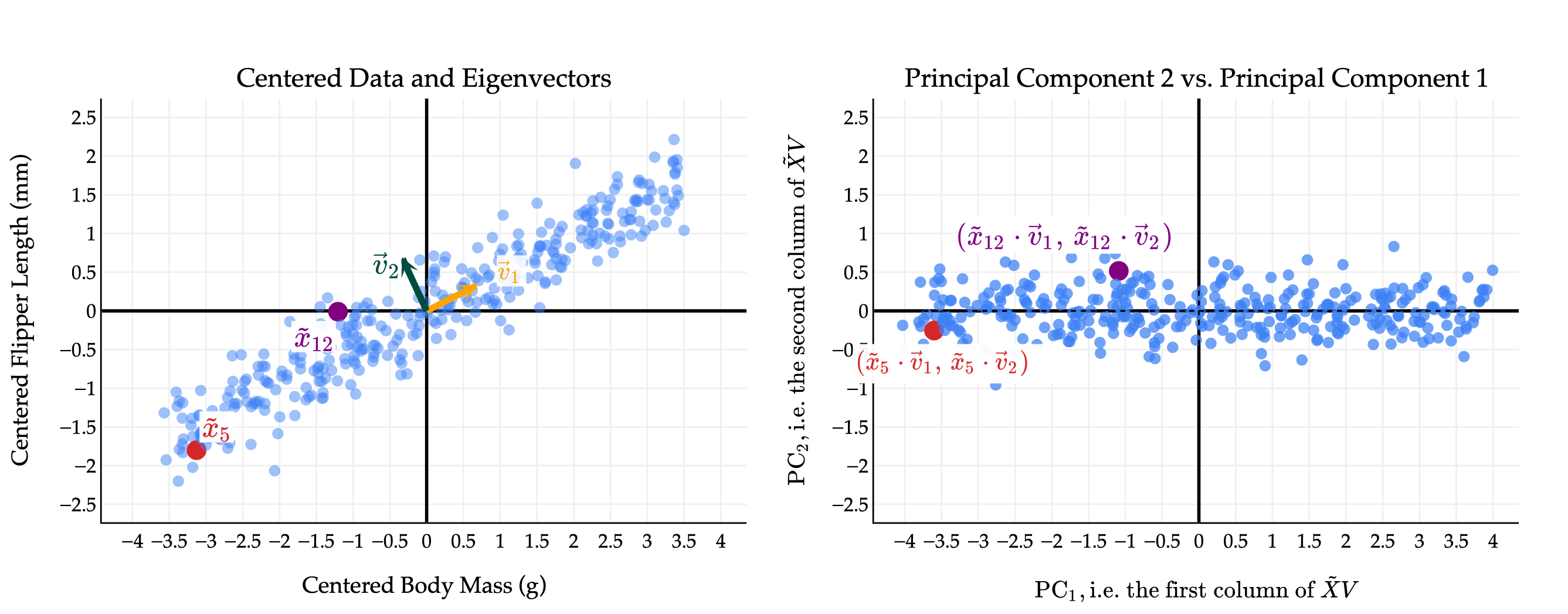
The first thing you should notice is that while the original data points seem to have some positive correlation, the principal components are uncorrelated! This is a good thing; it’s what we wanted as a design goal. In effect, by converting from the original features to principal components, we’ve rotated the data to remove the correlation between the features.
I have picked two points to highlight, points 5 and 12 in the original data. The coloring in red and purple is meant to show you how original (centered) data points translate to points in the principal component space.
Notice the scale of the data: PC1 axis is much longer than the PC2 axis, since the first principal component captures much more variance than the second. We will make this notion – of the proportion of variance captured by each principal component – more precise soon.
(You’ll notice that the body mass and flipper length values on the left are much smaller than in the original datasets; in the original dataset, the body mass values were in the thousands, which distorted the scale of the plot and made it hard to see that the two eigenvectors are indeed orthogonal.)
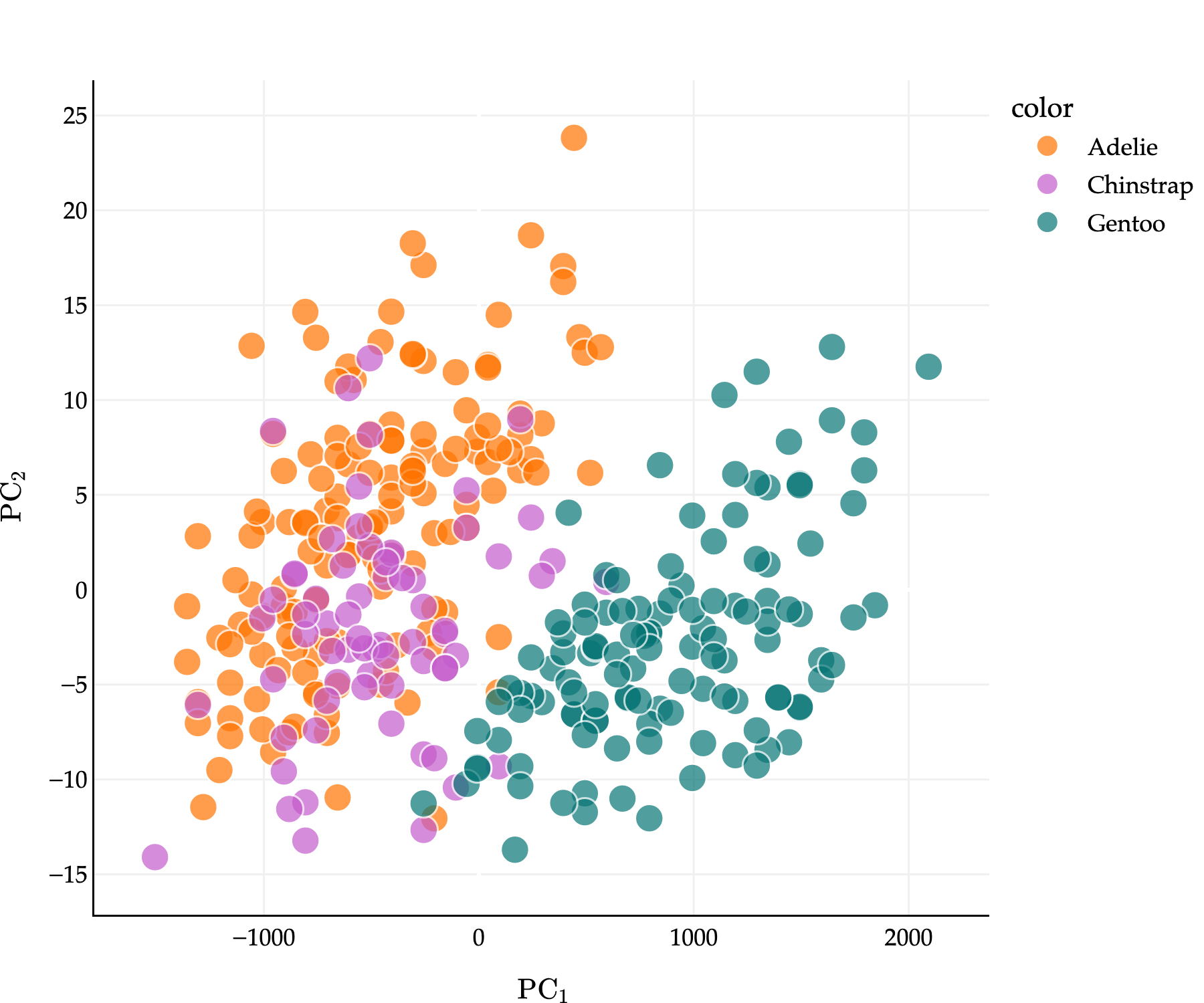
The real power of PCA reveals itself when we start with high-dimensional data. Suppose we start with three of the features in the penguins dataset: bill_depth_mm, flipper_length_mm, and body_mass_g – and want to reduce the dimensionality of the data to 1 or 2. Points are colored by their species.
Observe that penguins of the same species tend to be clustered together. This, alone, has nothing to do with PCA: we happen to have this information, so I’ve included it in the plot.
If X is the 333×3 matrix of three features, and X~ is the mean-centered version, the best directions in which to project the data are the columns of V in X~=UΣVT.
It’s important to remember that these “best directions” are nothing more than linear combinations of the original features. Since the first row of VT is [−0.001150.015190.99988], the first principal component is
PC 1i=−0.00115⋅bill depthi+0.01519⋅flipper lengthi+0.99988⋅body massi
while the second is
PC 2i=0.10294⋅bill depthi−0.99457⋅flipper lengthi+0.01523⋅body massi
and third is
PC 3i=0.99468⋅bill depthi+0.10295⋅flipper lengthi−0.00042⋅body massi
where i=1,2,…,333 is the index of the penguin.
To compute all three of these principal components at once, for every penguin, we just need to compute X~V.
pcs = X_three_features_centered @ vt.T
pcs
Loading...
Let’s plot the first two principal components: that is, for each of our 333 penguins, we’ll plot their value of X~v1 on the x-axis and their value of X~v2 on the y-axis.
This is the best 2-dimensional projection of our 3-dimensional scatter plot. And here’s the kicker: penguins of the same species STILL tend to be clustered together in the principal component space!
What this tells us is that our technique for taking linear combinations of the original features is good at preserving the important information in the original dataset. We went from writing down 3 numbers per penguin to 2, but it seems that we didn’t lose much information per penguin.
What do I mean by “much important information”? Let’s make this idea more precise.
The goal of PCA is to find new features – principal components – that capture as much of the variation in the data as possible, while being uncorrelated with each other.
PCA isn’t foolproof: it works better on some datasets than others. If the features we’re working with are already uncorrelated, PCA isn’t useful. And, even for datasets that are well suited for PCA, we need a systematic way to decide how many principal components to use. So far, we’ve often used 1 or 2 principal components for the purposes of visualization, but in general, we need a more systematic approach. What if we start with an n×50 matrix and want to decide how many principal components to compute?
Let’s define the total variance of an n×d matrix X as the sum of the variances of the columns of X. If xi(j) is the i-th value of the j-th feature, and μj is the mean of the j-th feature, then the total variance of X is
total variance=j=1∑d(n1i=1∑n(xi(j)−μj)2)
Let’s compute this for X_three_features.
X_three_features.var(ddof=0) # The variances of the individual columns of X.
(X_three_features_centered @ vt.T).var(ddof=0).sum() # Same sum as before.
646625.1411755901
Why? If we create the same number of principal components as we have original features, we haven’t lost any information – we’ve just written the same data in a different basis. The goal, though, is to pick a number of principal components that is relatively small (smaller than the number of original features), but still captures most of the variance in the data.
Each new principal component – that is, each column of X~V – captures some amount of this total variance. What we’d like to measure is the proportion (that is, fraction, or percentage) of the total variance that each principal component captures. The first principal component captures the most variance, since it corresponds to the direction in which the data varies the most. The second principal component captures the second-most variance, and so on. But how much variance does the first, second, or j-th principal component capture?
Recall from earlier that the variance of the data projected onto a vector v is given by
PV(v)=n1∥X~v∥2
v1 maximizes this quantity, which is why the first principal component is the projection of the data onto v1; v2 maximizes the quantity subject to being orthogonal to v1, and so on.
Then, the variance of PC1 is whatever we get back when we plug v1 into the formula above, and in general, the variance of PCj is PV(vj) (again, where vj is the j-th column of V in the SVD of X~). Observe that if vj is the j-th column of V in X~=UΣVT, then,
Here, we used the ever important fact that X~vj=σjuj, where σj is the j-th singular value of X~ and uj is the j-th column of U in the SVD of X~.
What this tells us is that the variance of the j-th principal component is nσj2. This is a beautiful result – it tells us that the variance of the j-th principal component is simply the square of the j-th singular value of X~, divided by n. The σj’s in the SVD represent the amount that the data varies in the direction of vj! We don’t need any other fancy information to compute the variance of the principal components; we don’t need to know the individual principal component values, or have access to a variance method in code.
u, s, vt = np.linalg.svd(X_three_features_centered)
s
Since the total variance of X is the sum of the variances of its principal components, the total variance of X is then the sum of nσj2 over all j=1,2,…,r, where r=rank(X). (Remember that if k>r, then σk=0.)
total variance=j=1∑rnσj2
So, if we single out just one principal component, how much of the overall variation in X does it capture? The answer is given by the proportion of variance explained by the j-th principal component:
proportion of variance explained by PC j=∑k=1rσk2σj2
This is a number between 0 and 1, which we can interpret as a percentage.
(s ** 2) / (s ** 2).sum() # The proportions of variance explained by each principal component.
array([0.99992331, 0.00007277, 0.00000392])
The above tells us that in X_three_features, the first principal component captures 99.99% of the variance in the data! There’s very little information lost in projecting this 3-dimensional dataset into 1-dimensional space.
Often, the proportions above are visualized in a scree plot, as you’ll see in Homework 11. Scree plots allow us to visually decide the number of principal components to keep, based on where it seems like we’ve captured most of the variation in the data. We’ll work on a related example in live lecture.
Let’s briefly summarize what I’ll call the “PCA recipe”, which describes how to find the principal components (new features) of a dataset.
Starting with an n×d matrix X of n data points in d dimensions, mean-center the data by subtracting the mean of each column from itself. The new matrix is X~.
Compute the singular value decomposition of X~: X~=UΣVT. The columns of V (rows of VT) describe the directions of maximal variance in the data.
Principal component j comes from multiplying X~ by the j-th column of V.
PCj=X~vj=σjuj
The resulting principal components – which are the columns of X~V – are uncorrelated with one another.
The variance of PCj is nσj2. The proportion of variance explained by PCj is
proportion of variance explained by PC j=∑k=1rσk2σj2