In Chapter 7.1, we learned how to use our knowledge of spans and projections to recast the problem of finding optimal model parameters for the simple linear regression model, . Along the way, we defined new characters, most importantly, the design matrix
Here, we’ll look at how and why to extend to include multiple input features, in what’s called multiple linear regression.
Incorporating Multiple Features
Motivation
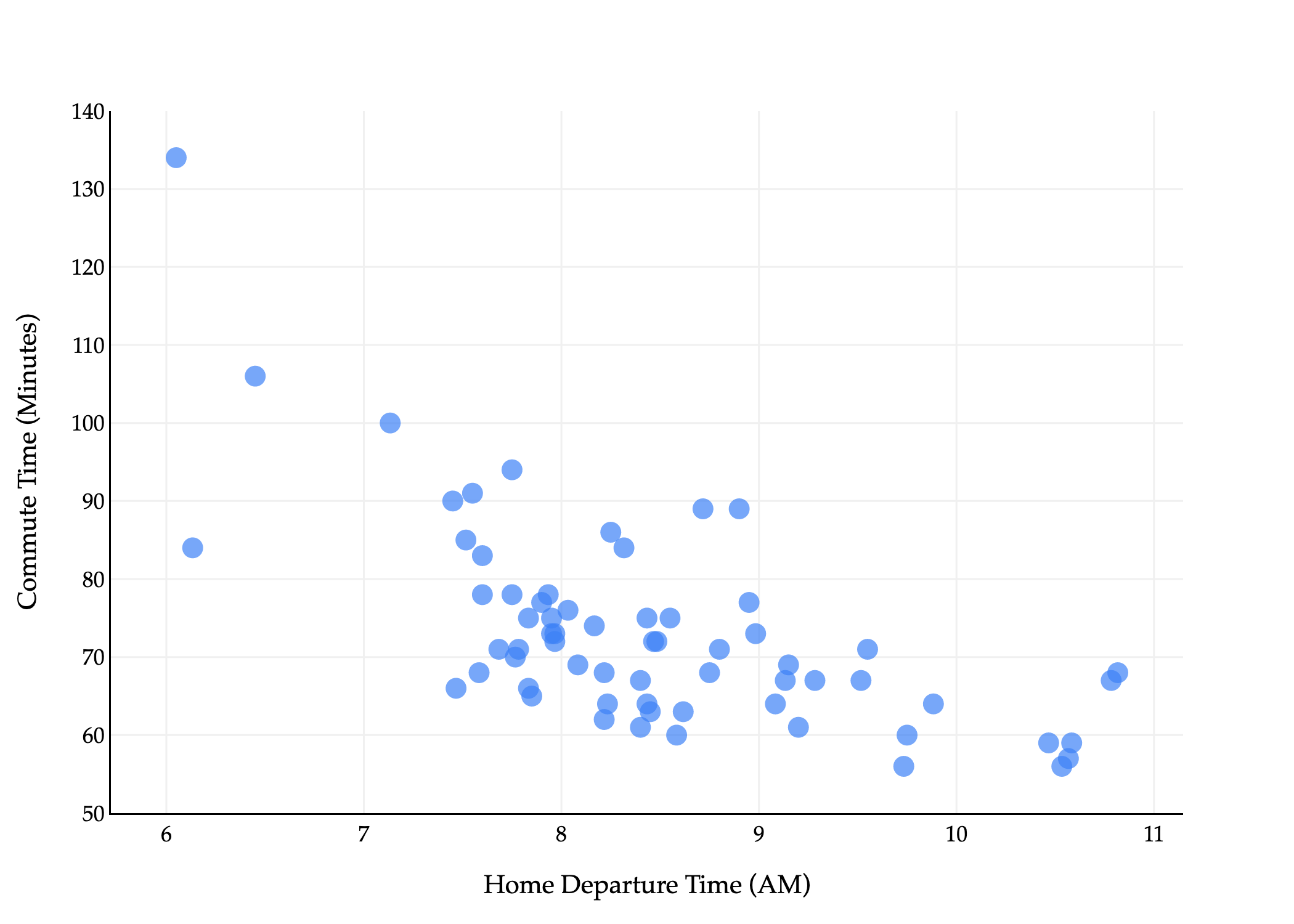
The commute times dataset that we were reintroduced to in Chapter 7.1 has several columns in it, but we’ve only used one – departure_hour – as an input variable.
commutes_full.head()Let’s take a look at a subset of them.
commutes_full[['departure_hour', 'day', 'day_of_month', 'minutes']].head()For example, the first row above tells us that the first recorded commute was on a Monday, which was the 15th of that month.
Using day seems like it would be a good idea, since traffic patterns likely differ based on the day of the week. But, it’s not clear how to use strings, like 'Tue', in a linear model. We’ll address this in a moment. For now, suppose we’d like to fit a linear model that predicts commute time in minutes using both departure_hour and day_of_month (“dom” for short).
Such a hypothesis function is of the form
which is a plane in . Once we figure out how to find , , and , we’ll visualize the resulting plane, not to worry.
(To be crystal clear, the ’s in the above equations refer to “regular” scalar multiplication, not the dot product. There are no vectors in the equation above.)
But, how do we find these three optimal model parameters? If we consult the modeling recipe, and choose squared loss, we need to find the values of , , and that minimize
The solution is to use what we know about spans, projections, and the design matrix. The design matrix for this problem will have 3 columns: a column of 1’s for the intercept, a column of departure_hour values, and a column of dom values.
To find , all we need to do is define the observation vector, , and find the that minimizes
which is a solved problem at this point: it’s the that satisfies the normal equation, .
Generalized Notation
Let me try and state this problem in slightly more general terms, where we have features rather than just 1 or 2.
As before, subscripts distinguish between individuals (rows) in our dataset, and we will try and use superscripts (in parentheses) to distinguish between features (columns). Specifically, we’ll use the notation to represent the -th feature for the -th individual. In the example above, is the departure hour for the 5th row in the dataset. Think of , , ... as new variable names, like new letters.
Consider the following example dataset.
There are rows, each of which has features (minutes is not a feature, it’s what we’re trying to predict).
We can represent each row (day) with a feature vector, . A feature vector contains all of the information we’re using to make predictions for the -th individual.
In general,
Note that if our model has features, then there are parameters, , , , ..., . There is one parameter for each feature, plus one for the intercept. So, the generalized multiple linear regression model has a hypothesis function of the form
It’d be great if we could express our hypothesis function as a dot product between a parameter vector and a feature vector , but we can’t: has components while has components.
To address this issue, we’ll define the augmented feature vector, , which is the vector obtained by adding a 1 to the front of feature vector (much like the design matrix has a column of 1’s).
Then, the multiple linear regression model can be written as
The General Problem
Now we can finally state the problem of multiple linear regression in its most general form. Suppose we have data points, , where each is a feature vector of features:
We’d like to find a good linear model,
By good, we mean that we’d like to find optimal parameters , , ..., that minimize mean squared error:
The solution is to define the design matrix and -dimensional observation vector :
and to solve the normal equation to find the optimal parameter vector, :
The that satisfies the equations above minimizes mean squared error, , so use this to make predictions in . Once you find that ,
is a prediction vector of predicted -values for the entire dataset. It is also the projection of onto the span of the columns of .
is the predicted -value for just the input .
Using sklearn
Earlier in the course, we saw how to use sklearn to fit a simple linear regression model. Performing multiple linear regression is just as easy.
from sklearn.linear_model import LinearRegression

model_multiple = LinearRegression()
model_multiple.fit(X=commutes_full[['departure_hour', 'day_of_month']], y=commutes_full['minutes'])After calling fit, we can access .
model_multiple.intercept_, model_multiple.coef_(141.86402699471932, array([-8.2233821 , 0.05615985]))The outputs above tell us that the “best way” (according to squared loss) to make commute time predictions using a linear model is using:
This is the plane of best fit given historical data; it is not a causal statement.
Fit LinearRegression objects have a predict method, which can be used to predict commute times given a departure_hour and day_of_month.
# What if I leave at 9:15AM on the 26th of the month?
# To supress the warning below, we should convert X and y to numpy arrays before calling .fit.
model_multiple.predict([[9.25, 26]])
/Users/surajrampure/miniforge3/envs/pds/lib/python3.10/site-packages/sklearn/base.py:493: UserWarning:
X does not have valid feature names, but LinearRegression was fitted with feature names
array([67.25789852])model_multiple.predict(pd.DataFrame({'departure_hour': [9.25], 'day_of_month': [26]}))array([67.25789852])Comparing Models
While it’s not difficult to implement ourselves, sklearn has a built-in mean_squared_error function.
from sklearn.metrics import mean_squared_error
mean_squared_error(commutes_full['minutes'], model_multiple.predict(commutes_full[['departure_hour', 'day_of_month']]))96.78730488437492So, the mean squared error of our plane of best fit is 96.78 .
Throughout this section, we’ll fit various different models to the commute times dataset, and it’ll be useful to keep track of their mean squared errors in one place. I’ll do so in a Python dictionary. (I’m intentionally showing you more code than I typically have, so you have some sense of how to do this all yourself – I hope you don’t mind!)
mse_dict = {}

# Multiple linear regression model.
mse_dict['departure_hour + day_of_month'] = mean_squared_error(commutes_full['minutes'], model_multiple.predict(commutes_full[['departure_hour', 'day_of_month']]))

# Simple linear regression model.
model_simple = LinearRegression()
model_simple.fit(X=commutes_full[['departure_hour']], y=commutes_full['minutes'])
mse_dict['departure_hour'] = mean_squared_error(commutes_full['minutes'], model_simple.predict(commutes_full[['departure_hour']]))

# Constant model.
model_constant = commutes_full['minutes'].mean()
mse_dict['constant'] = mean_squared_error(commutes_full['minutes'], np.ones(commutes_full.shape[0]) * model_constant)

mse_dict
{'departure_hour + day_of_month': 96.78730488437492,
'departure_hour': 97.04687150819183,
'constant': 167.535147928994}As you can see, adding day_of_month barely reduced our model’s mean squared error, which matches our intuition that knowing whether it’s the 15th or 19th or 3rd of the month doesn’t seem like it would be helpful in predicting commute time. The activity below has you think about why the mean squared error still did decrease, and whether this is always the case.
Activity 1
Activity 1
Recall, training data is the data that we use to fit/train/create the model. Test data refers to any other data that we might use to evaluate the model’s performance.
As we add more features, the mean squared error of a model’s predictions on the training data will never increase. Why?
Could a model’s mean squared error on test data increase as we add more features? When would it?
Feature Engineering
So far, we’ve limited ourselves to using departure_hour and day_of_month, two features that already came to us in the dataset. In practice, we’ll often need to engineer features, which means creating new features from existing ones, or “transforming” raw data into good features. We might do this to improve model performance, for example, in case the relationship between the features and output variable isn’t truly linear, or maybe even to enable the use of categorical features.
Example: One Hot Encoding
Suppose we’d like to use the day column from commutes_full as a feature.
commutes_full[['departure_hour', 'day', 'day_of_month']].head()One naive approach would be to convert each day value to a number, e.g. "Mon" is 1, "Tue" is 2, "Wed" is 3, etc. The reason this is a bad idea is that this approach implies that Monday is somehow “less than” Tuesday and should impact our model’s predictions less than Tuesday (remember that this column will be multiplied by a parameter in order to make predictions). This is what’s called an ordinal encoding, and these only make sense when the features have some inherent order that is meaningful to the prediction problem.
Instead, we’ll perform one hot encoding, which turns a categorical feature into several binary features: one per unique value of the categorical feature.
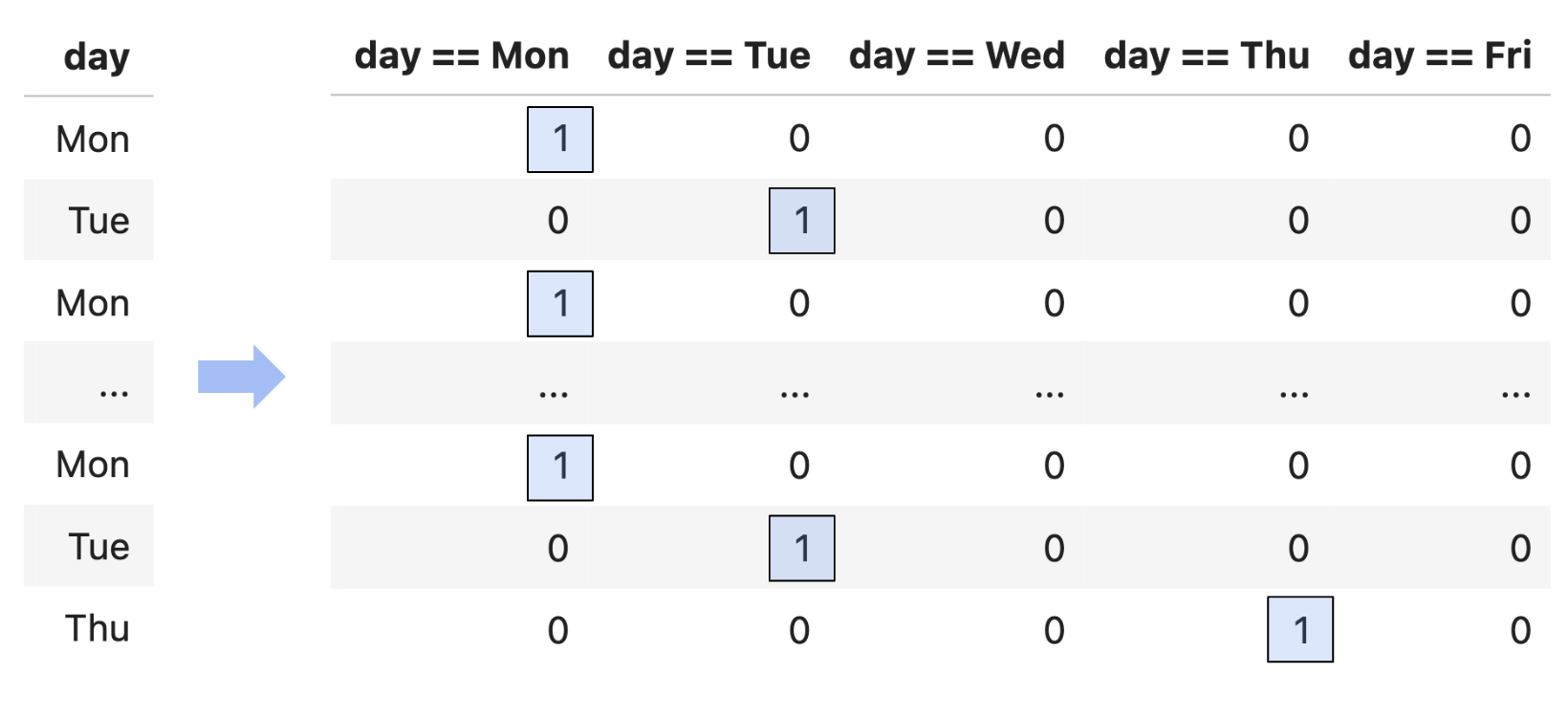
Since day has 5 unique values, we’ll need to create 5 new binary features.
# pandas Series have a value_counts method, which describes the frequency of each unique value in the Series.
commutes_full['day'].value_counts()
day
Tue 25
Mon 20
Thu 15
Wed 3
Fri 2
Name: count, dtype: int64Suppose we want to build a model that predicts minutes using departure_hour, day_of_month, and one hot encoded day. That model would have features, so its design matrix would have columns!
The actual process of one hot encoding can be done efficiently using sklearn.preprocessing.OneHotEncoder. You’ll see how to use this in a homework assignment.
Note that while it looks like the day == Wed, day == Thu, and day == Fri columns are all 0’s, this is just because there were no Wednesday, Thursday, or Friday values in the first five rows of the dataset. Somewhere later on in the dataset, there were rows with Wednesday, Thursday, or Friday values, and so those columns have non-zero values later on. If there were never any Wednesday, Thursday, or Friday values, then we wouldn’t make those columns in the first place (just like we never made a Saturday column, or a Zebra column, etc.).
Question: What is the rank of the design matrix, whose first five rows are shown above?
You might notice that among the 5 binary columns, in a particular row, exactly one of them is 1, and the other 4 are 0. This means that if we sum together the 5 binary columns, we’ll get a column of 1’s – which is already the first column in our design matrix!
This means that, by default, when we perform one hot encoding, the design matrix doesn’t have full rank. This doesn’t stop us from projecting onto , but it does mean that there are infinitely many possible optimal parameters . Again, all of these would give us the same predictions and same mean squared error, but it’s annoying to have to deal with this setting.
np.linalg.matrix_rank(X_for_ohe) # Not 8!7X_for_ohe['day == Mon'] + X_for_ohe['day == Tue'] + X_for_ohe['day == Wed'] + X_for_ohe['day == Thu'] + X_for_ohe['day == Fri']0 1
1 1
2 1
3 1
4 1
..
60 1
61 1
62 1
63 1
64 1
Length: 65, dtype: int64So, a common solution when performing one hot encoding is to drop one of the binary columns. This doesn’t change the information conveyed by the other features, and doesn’t change , which is what matters for the quality of the model’s predictions. And intuitively, even if we don’t have the value of day == Fri, we know it’s Friday if day == Mon, day == Tue, day == Wed, and day == Thu are all 0.
Now that we’ve converted day to a numerical variable, we can use it as input in a regression model. Here’s the model we’ll try to fit:
This model has 6 features (1 + 1 + 4) and hence 7 parameters. Its design matrix is .
X_for_ohe = for_ohe[['1', 'departure_hour', 'day_of_month', 'day == Mon', 'day == Tue', 'day == Wed', 'day == Thu']]
X_for_ohe.head()Notice that below, I’ve set fit_intercept=False, because I manually added a column of 1’s to the design matrix, so I don’t need sklearn to add another one.
model_with_ohe = LinearRegression(fit_intercept=False)
model_with_ohe.fit(X=X_for_ohe, y=commutes_full['minutes'])model_with_ohe.coef_array([ 1.34043066e+02, -8.41714813e+00, -2.52657944e-02, 5.09024617e+00,
1.63763100e+01, 5.11983892e+00, 1.14972088e+01])So, our linear model to predict commute time given departure_hour, day_of_month, and day (Mon, Tue, Wed, or Thu) is:
While this model has 6 features, and thus requires 7 dimensions to graph, it’s really a collection of five parallel planes in 3D, all with slightly different -intercepts! Remember that , , etc. aren’t all free variables: if one of them is 1, the others must be 0. There are 5 cases to consider, and each one corresponds to one of these 5 parallel planes. You’re exploring this idea in Homework 7, Question 3.
If we do want to visualze the model in , we need to pick a single feature to place on the -axis.
Despite being a linear model, this model doesn’t look like a straight line, since it’s linear in terms of all 6 features, but when you project it into 2D, it no longer appears linear.
How does this new model compare to our previous models?
mse_dict['departure_hour + day_of_month + day'] = mean_squared_error(
    commutes_full['minutes'],
    model_with_ohe.predict(X_for_ohe)
)

mse_dict
{'departure_hour + day_of_month': 96.78730488437492,
'departure_hour': 97.04687150819183,
'constant': 167.535147928994,
'departure_hour + day_of_month + day': 70.21791287461917}Note that adding the day of the week decreased our model’s mean squared error significantly: this one hot encoded model is our best yet.
Activity 2
Activity 2
Suppose we use the code below to build a multiple linear regression model to predict the width of a fish, given its height and weight.
model = LinearRegression()
model.fit(X, y)

# Used in the answer choices below.
ws = np.append(model.intercept_, model.coef_)
preds = model.predict(X)
squares = X.shape[0] * mean_squared_error(y, preds)
Assume that:
and
Xrefer to the full rank design matrix used to fit the model.and
yrefer to the obdservation vector.refers to the optimal parameter vector found by
sklearn.
In each column of the grid below, select all mathematical expressions that have the same value as the expression provided in the column header. Some rows may end up empty, but every column should have at least one expression picked. Assume that 0 and are the same for the purposes of this question.
Solution
Let’s look at each column one by one.
preds, in math, is a vector of predicted values, . Since ’s columns are linearly independent, is the unique vector , and so .wsis , as discussed above.squaresis the mean squared error of the predictions, multiplied by (i.e. it’s the sum of squared errors). Mean squared error is , sosquaresis .np.sum(y - preds)is the sum of the components in , which we know is 0. This is because:contains a column of 1’s, and
the error vector must be orthogonal to each of ’s columns, so
, so
. This was introduced in Chapter 6.3 and revisited in Chapter 7.1.
So, any other expression on the left that is equal to 0 (or ) should be selected.
0, the first row, should be seleccted.
is equal to , since satisfies the normal equations, .
is equal to 0, using the logic above.
Example: Numerical Transformations
Another common step in feature engineering is to produce new numerical features out of existing ones.
As an example, I could fit a degree 2 polynomial model
by producing the design matrix
Below, we’ll apply this thinking to the departure_hour feature. We’ll create these features manually, though in homework assignments you’ll see how to do this easily and more efficiently using sklearn.preprocessing.PolynomialFeatures.
X_for_quadratic = commutes_full[['departure_hour']].copy()
X_for_quadratic['departure_hour^2'] = X_for_quadratic['departure_hour'] ** 2

model_quadratic = LinearRegression()
model_quadratic.fit(X=X_for_quadratic, y=commutes_full['minutes'])
model_quadratic.intercept_, model_quadratic.coef_
(351.324480895268, array([-57.14500476, 2.8270457 ]))This tells us that the best-fitting quadratic model is
which looks like:
This is a linear model, even though the features themselves are made up of non-linear functions.
If we treat and as two separate features, then each data point lives in with coordinates
In that feature space, the model is
so the predictions lie on a plane. It only looks curved when we project back down to the usual 2D plot of departure_hour versus minutes, because the points we draw must satisfy the relationship .
We could follow the same idea to fit a degree 3 polynomial model, or a degree 4 polynomial model, or a degree 5 polynomial model, and so on. Just to try this one more time, let’s fit a degree 3 model.
X_for_cubic = commutes_full[['departure_hour']].copy()
X_for_cubic['departure_hour^2'] = X_for_cubic['departure_hour'] ** 2
X_for_cubic['departure_hour^3'] = X_for_cubic['departure_hour'] ** 3

model_cubic = LinearRegression()
model_cubic.fit(X=X_for_cubic, y=commutes_full['minutes'])
model_cubic.intercept_, model_cubic.coef_
(816.0936290109973, array([-227.63718864, 23.33213694, -0.80864398]))Overfitting
Is this model better than the simple linear regression model or quadratic model from earlier?
75.27, the mean squared error of the cubic model, is lower than the simple linear regression model’s mean squared error of 97.04 (but worse than we got when one hot encoding day) and lower than the quadratic model’s mean squared error of 75.32.
Keep in mind that adding complex features doesn’t always equate to a “better model”, even if it lowers the mean squared error on the training data. To illustrate what I mean, what if we fit a degree 10 polynomial to the data?
Without computing it, we can tell this model’s mean squared error is lower than that of the simple linear, quadratic, or cubic models, since it passes closer to the training data. But, this model is overfit to the training data. Remember, our eventual goal is to build models that generalize well to new data, and it seems unlikely that this degree 10 polynomial reflects the true relationship between departure hour and commute time in nature.
The question, then, is how to choose the right model, e.g. how to choose the right polynomial degree, if we’re committed to making polynomial features. The solution is to intentionally split our data into training data and test data, and use only the training data to pick the features we’d like to include (e.g. polynomial degree). Then, we pick the combination of features that performed best on the test data, since that combination of features seems most likely to generalize well on unseen data. You’ll explore this paradigm in homework assignments.
In the above examples, I created polynomial features out of departure_hour only, but there’s nothing stopping me from creating features out of day_of_month too, or out of both of them simultaneously. A perfectly valid model is
which, using our more generic syntax, would look like
You may wonder, how do I know which features to create? Through a variety of techniques:
Domain knowledge
Trial and error
By visualizing the data
In the polynomial examples above, the data didn’t particularly look like it was quadratic or cubic, so a linear model sufficed. But if we’re given a dataset that clearly has some non-linear relationship, visualization can help us identify what features might improve model performance.
As the dimensionality of our data increases, though, visualization becomes less possible. (How do we visualize a dataset with 100 features?) Strategies for reducing the dimensionality of our data will be explored in Chapter 10.
Linear in the Parameters
What is the extent to which I can use linear regression to fit a model? As long as a model can be expressed in the form
for some parameter vector and some feature vector , then it can be fit using linear regression (i.e. by creating a design matrix and finding by solving the normal equations). We say such a model is linear in the parameters. The choice of features to include in is up to us.
For example,
If is a scalar, then
is linear in the parameters. It would be linear in the parameters even if the term wasn’t there; then, we wouldn’t need to augment with a 1.
If and are scalars (e.g. height and weight), then
is linear in the parameters.
If is a scalar, then
is not linear in the parameters, because is within the function. This model can’t be written as for any choice of .