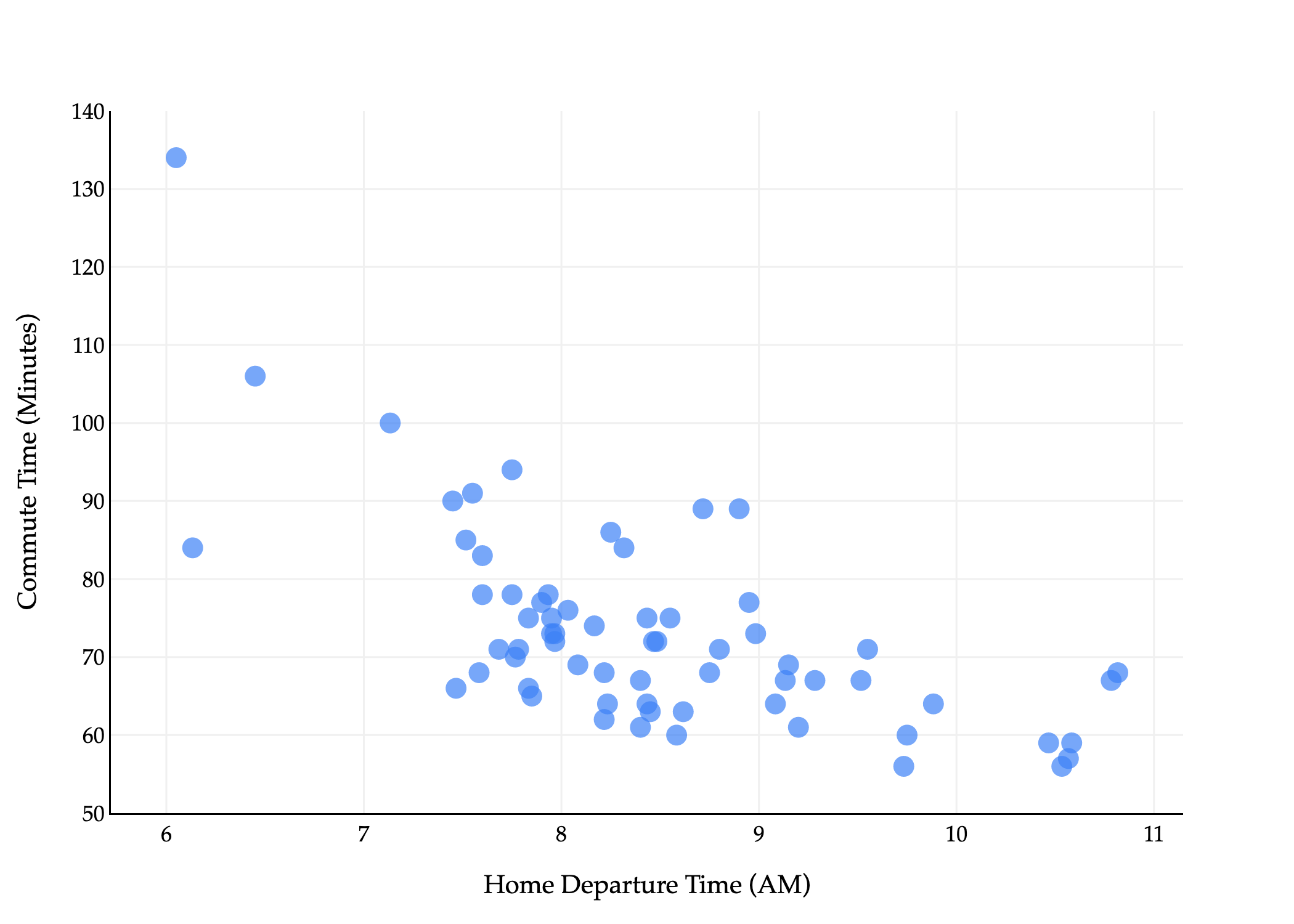
The time has finally come: let’s apply what we’ve learned about loss functions and the modeling recipe to “upgrade” from the constant model to the simple linear regression model.
To recap, our goal is to find a hypothesis function h such that:
So far, we’ve studied the constant model, where the hypothesis function is a horizontal line:
h(xi)=w
The sole parameter, w, controlled the height of the line. Up until now, “parameter” and “prediction” were interchangeable terms, because our sole parameter w controlled what our constant prediction was.
Now, the simple linear regression model has two parameters:
h(xi)=w0+w1xi
w0 controls the intercept of the line, and w1 controls its slope. No longer is it the case that “parameter” and “prediction” are interchangeable terms, because w0 and w1 control different aspects of the prediction-making process.
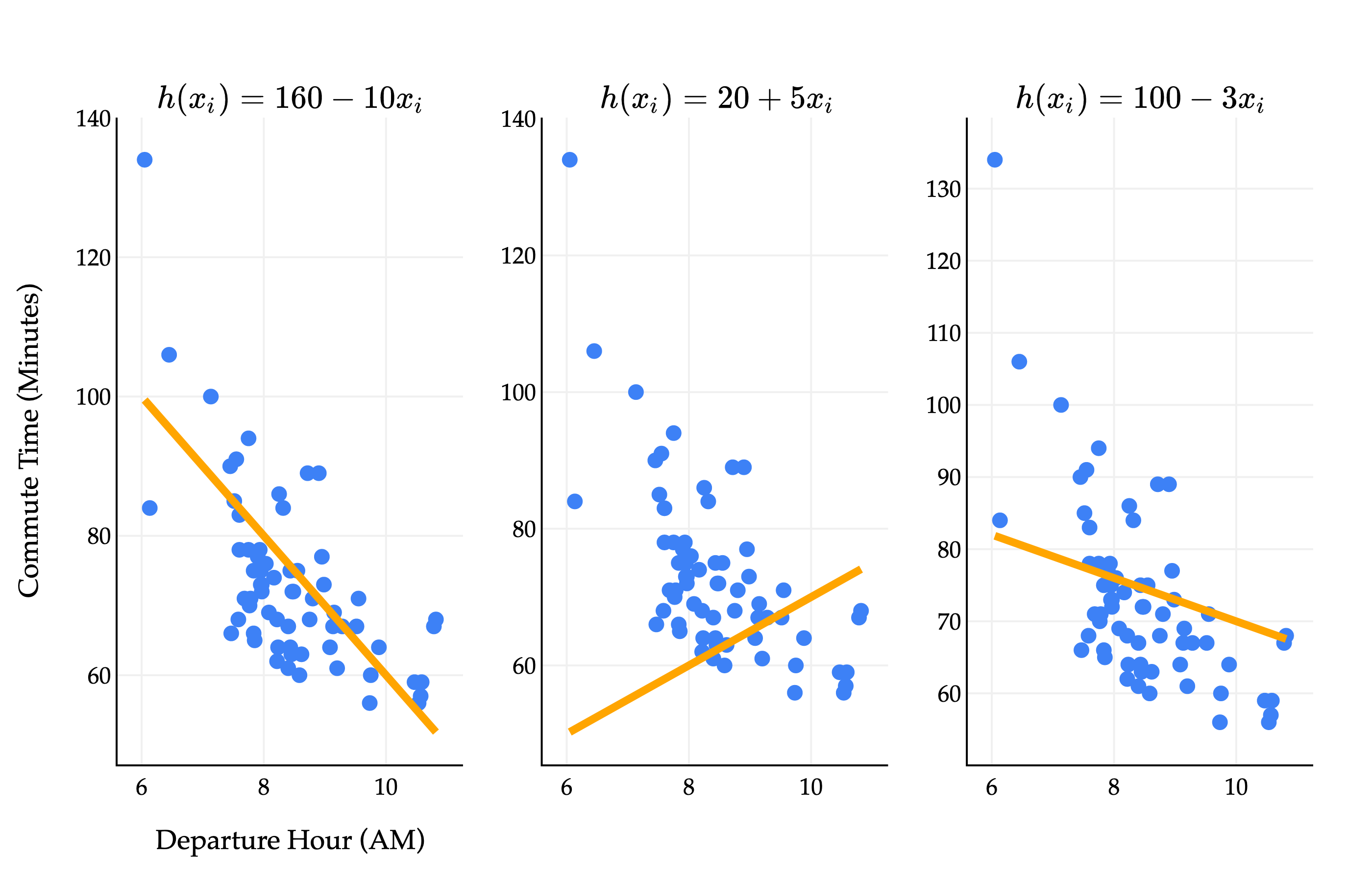
How do we find the optimal parameters, w0∗ and w1∗? Different values of w0 and w1 give us different lines, each of which fit the data with varying degrees of accuracy.
Consider a dataset with two points, (3,5) and (15,53). What are the optimal parameters, w0∗ and w1∗, for the line h(xi)=w0+w1xi that minimizes mean squared error for this dataset?
To make things precise, let’s turn to the three-step modeling recipe from Chapter 1.3.
1. Choose a model.
h(xi)=w0+w1xi
2. Choose a loss function.
We’ll stick with squared loss:
Lsq(yi,h(xi))=(yi−h(xi))2
3. Minimize average loss (also known as empirical risk) to find optimal parameters.
Average squared loss – also known as mean squared error – for any hypothesis function h, takes the form:
n1i=1∑n(yi−h(xi))2
For the simple linear regression model, this becomes:
Rsq(w0,w1)=n1i=1∑n(yi−(w0+w1xi))2
Now, we need to find the values of w0 and w1 that together minimize Rsq(w0,w1). But what does that even mean?
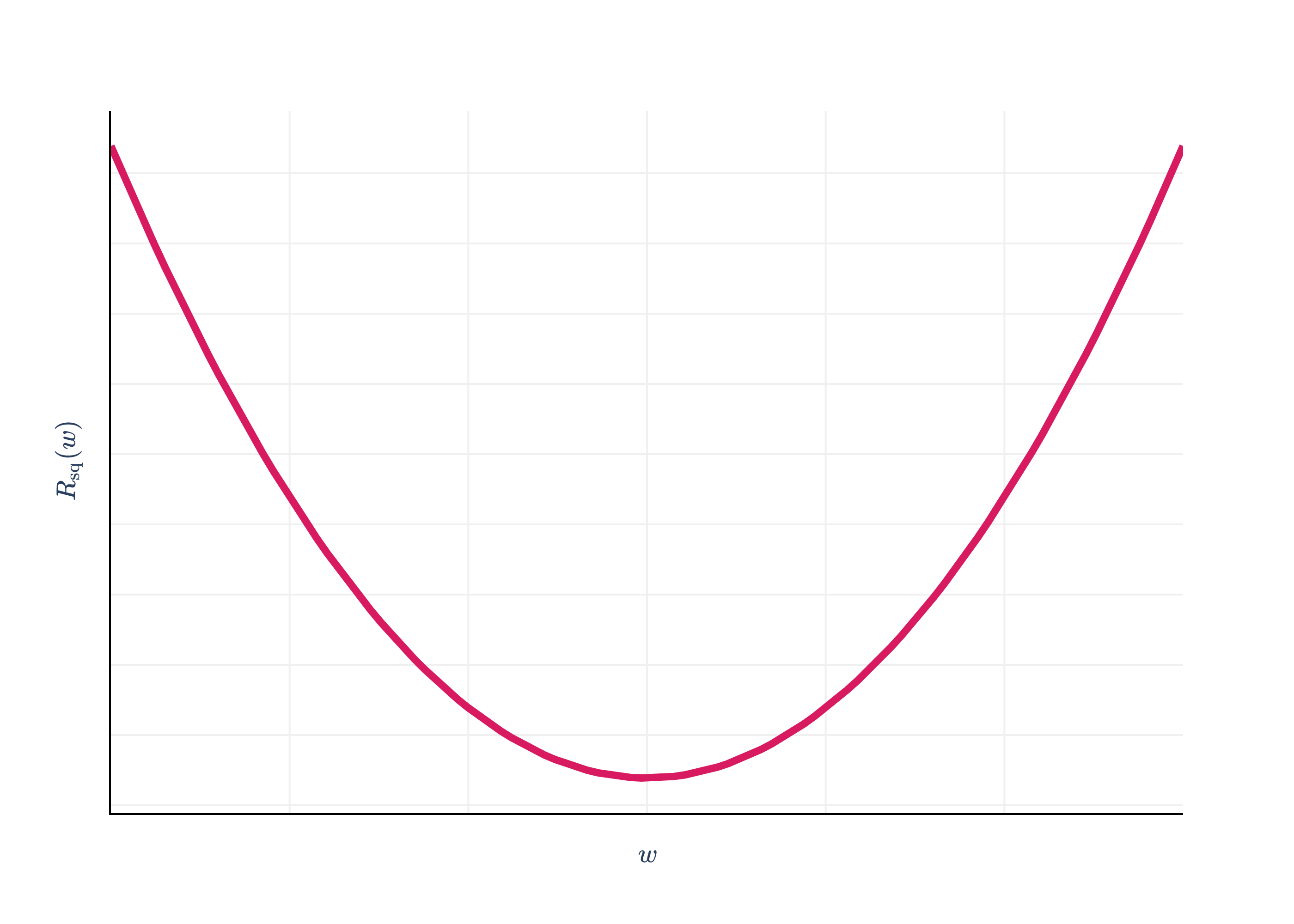
In the case of the context model and squared loss, where we had to minimize Rsq(w)=n1∑i=1n(yi−w)2, we did so by taking the derivative with respect to w and setting it to 0.
import pandas as pd
import numpy as np
import plotly.graph_objects as go
from plotly.subplots import make_subplots

df = pd.read_csv('data/commute-times.csv')

f = lambda h: ((72-h)**2 + (90-h)**2 + (61-h)**2 + (85-h)**2 + (92-h)**2) / 5

x = np.linspace(50, 110, 100)
y = np.array([f(h) for h in x])

# Calculate mean and variance
data = np.array([72, 90, 61, 85, 92])
mean = np.mean(data)
variance = np.mean((data - mean) ** 2)

fig = go.Figure()

fig.add_trace(
    go.Scatter(
        x=x,
        y=y,
        mode='lines',
        name='Data',
        line=dict(color='#D81B60', width=4)
    )
)

# Draw a point at the vertex (mean, variance)
# fig.add_trace(
#     go.Scatter(
#         x=[mean],
#         y=[variance],
#         mode='markers+text',
#         marker=dict(color='#D81B60', size=14, symbol='circle'),
#         text=[f"<span style='font-family:Palatino, Palatino Linotype, serif; color:#D81B60'>(mean, variance)</span>"],
#         textposition="top center",
#         showlegend=False
#     )
# )

fig.update_xaxes(
    showticklabels=False,
    showgrid=True,
    gridwidth=1,
    gridcolor='#f0f0f0',
    showline=True,
    linecolor="black",
    linewidth=1,
)

fig.update_yaxes(
    showgrid=True,
    gridwidth=1,
    gridcolor='#f0f0f0',
    showline=True,
    linecolor="black",
    linewidth=1,
    showticklabels=False
)

fig.update_layout(
    xaxis_title=r'$w$',
    yaxis_title=r'$R_\text{sq}(w)$',
    plot_bgcolor='white',
    paper_bgcolor='white',
    margin=dict(l=60, r=60, t=60, b=60),
    font=dict(
        family="Palatino Linotype, Palatino, serif",
        # color="black"
    ),
    showlegend=False
)

fig.show(renderer='png', scale=4)
Rsq(w) was a function with just a single input variable (w), so the problem of minimizing Rsq(w) was straightforward, and resembled problems we solved in Calculus 1.
The function Rsq(w0,w1) we’re minimizing now has two input variables, w0 and w1. In mathematics, sometimes we’ll write Rsq:R2→R to say that Rsq is a function that takes in two real numbers and returns a single real number.
Rsq(w0,w1)=n1i=1∑n(yi−(w0+w1xi))2
Remember, we should treat the xi’s and yi’s as constants, as these are known quantities once we’re given a dataset.
What does Rsq(w0,w1) even look like? We need three dimensions to visualize it – one axis for w0, one for w1, and one for the output, Rsq(w0,w1).
The graph above is called a loss surface, even though it’s a graph of empirical risk, i.e. average loss, not the loss for a single data point. The plot is interactive, so you should drag it around to get a sense of what it looks like. It looks like a parabola with added depth, similar to how cubes look like squares with added depth. Lighter regions above correspond to low mean squared error, and darker regions correspond to high mean squared error.
Think of the “floor” of the graph – in other words, the w0-w1 plane – as all the set of possible combinations of intercept and slope. The height of the surface at any point (w0,w1) is the mean squared error of the hypothesis h(xi)=w0+w1xi on the commute times dataset.
Our goal is to find the combination of w0 and w1 that get us to the bottom of the surface, marked by the gold point in the plot. This will involve calculus and derivatives, but we’ll need to extend our single variable approach: we’ll need to take partial derivatives with respect to w0 and w1. Chapter 2.2 is a detour that describes how these work; in Chapter 2.3, we’ll use them to find the optimal parameters.
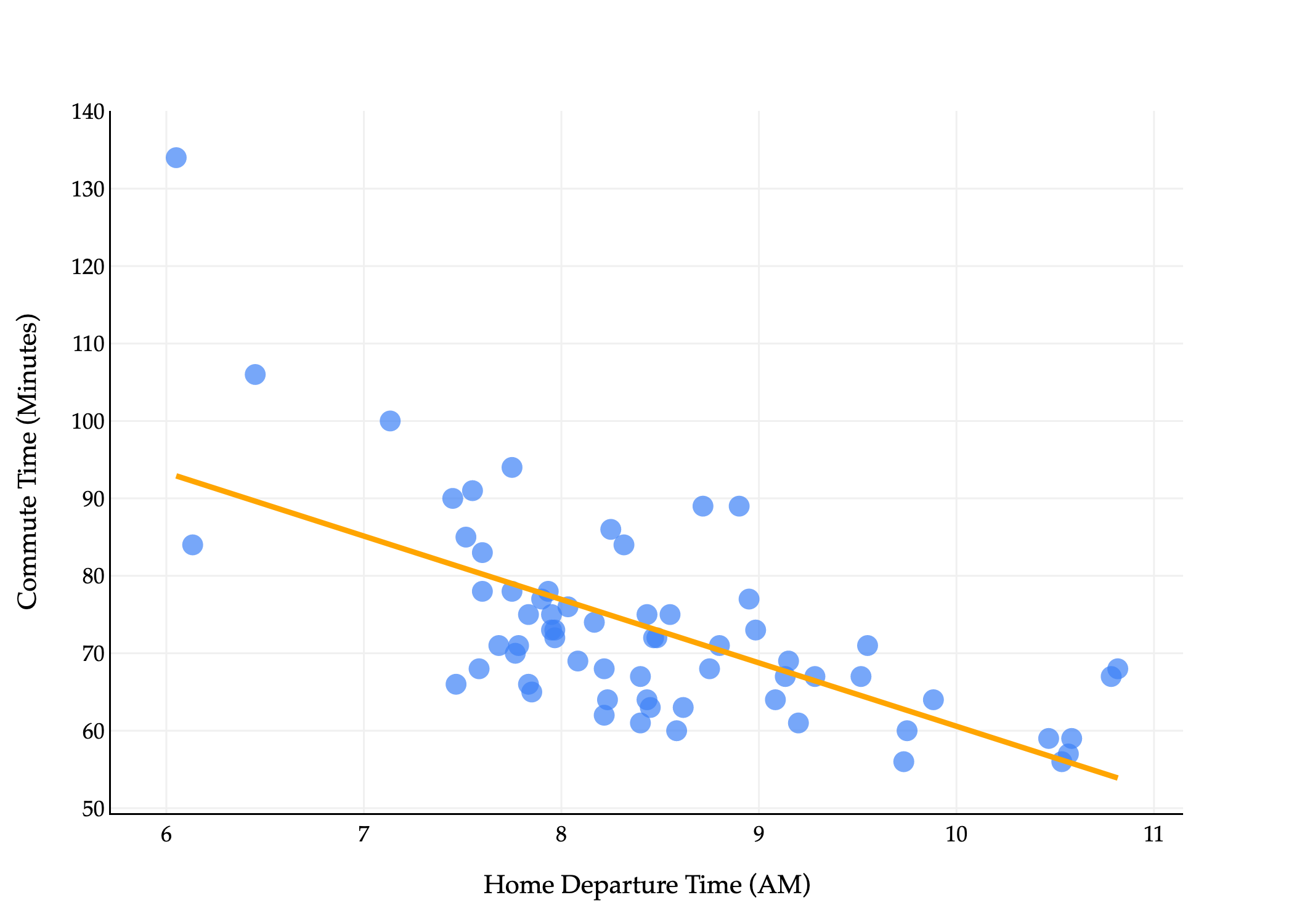
These are formulas that describe the optimal slope, w1∗, and intercept, w0∗, for the simple linear regression model, given a dataset (x1,y1),(x2,y2),…,(xn,yn). They are chosen to minimize mean squared error. On our commute times dataset, the resulting line looks like this:
import pandas as pd
import numpy as np
import plotly.express as px
import plotly.graph_objects as go

df = pd.read_csv('data/commute-times.csv')

# Compute means
x = df['departure_hour'].values
y = df['minutes'].values
x_bar = np.mean(x)
y_bar = np.mean(y)

# Compute slope (w1) and intercept (w0) using the closed-form solution
w1 = np.sum((x - x_bar) * (y - y_bar)) / np.sum((x - x_bar) ** 2)
w0 = y_bar - w1 * x_bar

# Prepare regression line points
x_line = np.array([x.min(), x.max()])
y_line = w0 + w1 * x_line

# Create scatter plot
fig = px.scatter(
    df,
    x='departure_hour',
    y='minutes',
    size=np.ones(len(df)) * 50,
    size_max=8
)
fig.update_traces(marker_color="#3D81F6", marker_line_width=0)

# Add regression line in orange
fig.add_traces(go.Scatter(
    x=x_line,
    y=y_line,
    mode='lines',
    line=dict(color='orange', width=3),
    name='Regression Line'
))

fig.update_xaxes(
    title='Home Departure Time (AM)',
    gridcolor='#f0f0f0',
    showline=True,
    linecolor="black",
    linewidth=1,
)
fig.update_yaxes(
    title='Commute Time (Minutes)',
    gridcolor='#f0f0f0',
    showline=True,
    linecolor="black",
    linewidth=1,
)
fig.update_layout(
    plot_bgcolor='white',
    paper_bgcolor='white',
    margin=dict(l=60, r=60, t=60, b=60),
    width=700,
    font=dict(
        family="Palatino Linotype, Palatino, serif",
        color="black"
    ),
    showlegend=False
)
fig.show(renderer='png', scale=3)